Category: Consulting

50 x faster development with AI tools

5x or 50x – why buying an AI license isn’t enough

You may be wondering whether using AI tools in software development brings real added value. We looked into the results of one of our consultants’ long-term client projects, and they were eye-opening. Not because AI adds value in software development, but because of how much AI tools can boost the work of a true professional.

Here’s the critical point that many people get wrong: it’s not enough to acquire an AI license and put the tool into use. That’s a start, of course, but it doesn’t produce results on its own. The multifold improvement in productivity comes from how the model is integrated into the everyday reality of development work.

The analysis highlighted three separate projects in which a developer used the same language model, but with very different results. In a modern Laravel project, productivity was as much as 20–50 times higher per individual feature. In an old legacy monolith, the benefit was smaller, but still clearly significant. Overall, the developer estimated being roughly five times faster than without AI tools.

The benefit depends on the environment and capabilities

Our developer leveraged three key things:

RAG (Retrieval Augmented Generation). The AI reads the project’s documentation, architecture, and coding conventions before generating anything. This lets us onboard the AI to understand the system instead of having it guess. This way, we can significantly reduce hallucination.

Explicit rules. The development team has written guidelines that tell the AI how things are done in this project. They cover folder structures, coding standards, and architectural patterns. It’s like onboarding a new developer, but it can be done instantly and all at once.

MCP tools. MCP, or Model Context Protocol, is a standard developed by Anthropic that seamlessly connects AI models (such as Claude) to external tools, databases, and APIs. It means the AI doesn’t just write code, but works directly with other systems. It reads databases, performs operations, and integrates into the production environment. New MCP tools can be built in minutes.

MCP solves the problem where even the most advanced AI model is effectively isolated from a company’s systems. Previously, every connection had to be built separately. MCP is like a shared plug – once it’s in use, new connections are created in a fraction of the time.

What does this mean for pricing and resourcing?

Here lies the question that public discussion doesn’t always dare to raise: if a developer is 5–50x faster, what follows from that? Should a consulting firm bill less, or should the client need smaller teams?

Our view is that an AI-native developer produces more business value in the same amount of time. The client gets more results – not just more lines of code.

A developer who knows how to build context, write AI rules, and leverage MCP integrations doesn’t simply write code faster. They operate on a different level than before, and this amounts to an entirely different role. For now, the client is the one who gets more for the same money. I’m comparing this, of course, to the time before AI tools. Consultants’ hourly billing rates may have risen by a few euros, but in the big picture, the client is the one who benefits most from the situation.

What does this mean for the client?

Based on the analysis, another opportunity also emerged – one we’ve already noticed with our other consultants as well: our consultants can help clients analyze their other systems, identify automation opportunities, and adopt AI-assisted workflows more broadly. This is consulting that wasn’t on the table before, and it delivers value to the client on top of traditional development work.

This is the shift now happening faster than we were able to imagine before. AI doesn’t replace developers, but developers who know how to use AI tools and language models correctly do things others can’t. And they are also the ones whose expertise is most sought after among our clients.

That’s why we at Identio have made AI part of our strategy. We see it as a key driver of growth, and every one of our consultants must master these tools and workflows. We invest in our consultants’ AI expertise regardless of whether their current client projects allow the use of AI tools. This way, we can ensure we’re able to offer our clients the best possible expertise for leveraging AI.

What’s next?

If you’re interested in what AI-native development could mean for your projects or your team, let’s talk. We’re happy to give an honest assessment of where AI could genuinely be useful in your project. And naturally, we can also tell you what kinds of environments and situations it shouldn’t be used in.

Identio is a technology company specializing in consulting. We use AI tools in our work, and every one of our consultants knows how to use them effectively in their own work. Our promise is that our consultants deliver value from day one.

claude code x figma

Claude Code × Figma – when code and design speak the same language, you get results faster

Design and code in different worlds

How many meetings does it take for a developer to build exactly what the designer intended? In most teams, the answer is: too many.

This isn’t due to carelessness or lack of skill. In most organizations, design and code simply live in different places: the design team in Figma, the development team in a code editor and between them flows a constant stream of meetings, comments, and tickets. Slow, and often unfortunately inefficient for both sides.

A pilot at a large Finnish company

We ran an AI pilot for a large Finnish company whose situation was a familiar one: design lived in Figma and implementation in code, with no smooth connection between the two. Iterations were made slowly, mediated by people, from one meeting to the next.

We set out to test one concrete question: could Claude Code and Figma together shorten this distance?

In practice, this meant the following: we took an existing view from the code into Figma and, on that basis, designed a new view that hadn’t yet been coded. Using Figma’s MCP Server, Claude Code generated a working React implementation from it. We validated the solution together with the client by going through the code, the time the implementation took, and the benefits it brought.

Beyond the obvious things – increased speed and a shortened design-to-development cycle – the resulting outcome matched the design perfectly, without the typical changes that creep in during coding. The distance between design and code shrank, and the end result genuinely matched the design that had been intended.

How does the workflow work in practice?

The process can start from either code or design. Typically from code: Claude Code builds the view as a React implementation, roughly but functionally. Through Figma’s integrations, it’s brought into Figma, where the designer sees the actual view rather than a separate mockup.

In Figma, the layout, typography, and colors are edited without anyone needing to touch the code. The changes flow back to Claude Code, which updates the implementation. The developer isn’t left guessing what the designer meant – they see it directly.

A springboard, not a revolution

While the workflow is admittedly genuinely impressive, it still won’t change everything. Designers’ and developers’ jobs remain secure going forward, even though faster collaboration will surely save time and make work more efficient.

This process is, however, a step toward a situation where design and code aren’t separate, disconnected files. A common language is found without anyone having to learn a new tool or give up an old one.

I’d especially like to challenge those teams where the line between design and code has always been clear and firmly in place. Try out what happens when a designer and a developer can look at and talk about the same thing, with no gap between them.

Where does this work best?

At Identio, we’ve noticed that the workflow between Claude and Figma works best in situations where design and development teams are used to operating separately. Building a design system or component library is also a natural starting point – though, when doing so, a clear understanding of who owns the design system needs to be front of mind.

And the workflow also works when the designer happens to be the person responsible for both design and implementation – a role that technically proficient designers will increasingly fill in the future.

Caveats

The code Claude Code generates needs to be reviewed. It doesn’t always know when it’s wrong, and it can be wrong very convincingly. Synchronization between Figma and code doesn’t work seamlessly in every situation, and in places that require accessibility or other precision, manual work may still be needed.

This doesn’t change what the AI pilot also demonstrated, though: the barrier to getting started is lower than ever, and that’s an excellent foundation for adopting new AI-assisted workflows.

Let’s try it together

We have experience with this workflow from both client projects and our own pilots. If you’d like to find out how it would fit your situation, get in touch and let’s think it through together!

software developer doing AI assisted work

100 % of our software developers use AI – and it shows in our clients’ results

AI has become a natural part of everyday software development. It gives developers new ways to work more efficiently, but it also demands an understanding of what it can do and how to use it responsibly. At Identio, we use AI in a range of ways: to support software development, to build clients’ own solutions, and as part of everyday problem-solving.

For us, using AI doesn’t mean taking shortcuts. It means finding smarter ways to do even higher-quality work for the client. We’ve created our own AI guidelines and, in autumn 2025, ran an internal survey on how our developers use AI in their client projects.

In this article, I’ll look at how Identio’s consultants use AI in their work, how we ensure responsible use, and what benefits it brings to our clients.

AI as part of software development

With AI already a fixed part of everyday development work, we’ve wanted to make sure that Identio has broad, up-to-date expertise around it. Every one of our consultants needs to master a range of AI solutions – but the final way of using them is always defined by the client company and their operating environment. Whatever the situation or purpose, AI has to be used professionally and in line with ethical principles.

AI isn’t just a tool that makes a developer’s day easier. It also delivers concrete benefits to the client: faster delivery, better quality, and lower risk of errors. At the same time, it frees up the developer’s time for higher-level thinking, namely seeing the bigger picture and developing the logic of the solution. These are things AI can’t do – at least not yet.

100% of our consultants master AI tools

What do we mean when we say that 100 % of our consultants master AI tools?

The figure is based on a survey we ran and on the conversations we’ve had with every single one of our consultants. In this context, daily use of AI means using AI- and language-model-based tools to support development work. Among the tools our consultants use are GitHub Copilot, ChatGPT, Gemini, Claude, Google AI Studio, Cursor, and Windsurf.

Our clients’ AI guidelines take precedence and bind us too, and sometimes that means development work is done entirely without AI. This is often the case in projects involving sensitive data or where security requirements are high. Because AI is a megatrend and a big part of our daily work, we think it’s important that every one of our consultants masters these tools, regardless of project-specific requirements.

AI will never replace an expert, but with AI-assisted software development we can bring more efficiency to the work and, in doing so, create even more value for our clients.

How our developers use AI

Our internal survey gave us a good overall picture of how our developers use AI in their daily work. Since we don’t define the terms of AI use on our own, the client’s guidelines and the consultant’s own preferences carry more weight. The ways of using it vary widely. That’s why the survey was a good way to map out AI use and get a comprehensive picture of where things stand.

The most common uses for AI include the following:

Code-related tasks Using AI for things like code completion while writing (basic autocomplete), generating test data, and writing SQL queries. AI also helps with fixing bugs and quality assurance. It can go through huge volumes of log files and monitor the state of a system to identify the causes of bugs. More advanced AI tools can also suggest concrete changes to the code to fix them.

Learning and grasping context AI helps explain and summarize new libraries or languages in a way that fits the context. Our consultants also use it to understand new concepts and apply them to an existing codebase, to gather background information for various tasks, or to get summaries or advice that used to come from Google or Stack Overflow. So it helps solve specific problems and reduces the need to hunt for technical information through other channels.

Ideation Exploring alternative implementation approaches and prototyping have become easier with AI. It speeds up finding different solution options considerably, especially in situations where it would be easy to fall back on more familiar patterns.

Drafting and communication AI helps draft and polish documents, create message templates, and condense documentation. As a result, they have more time to focus on what matters most: problem-solving and writing code.

Prompt strategies and custom GPTs We’ve found AI useful for things like iterating on prompts. Custom GPT versions – ones pre-loaded with background information – have also made work considerably more efficient.

A concrete, practical example with language models

Language models predict probabilities based on the inputs they’re given, but there’s always a degree of uncertainty involved. If a model doesn’t know the answer, it tries to infer it – sometimes incorrectly. That’s why we make use of the “tool calling” principle and the Model Context Protocol (MCP), a system for managing and connecting the context information AI models need, securely and in a distributed way.

With MCP, we can for example connect a language model to Figma, which lets it read the spacing and dimensions of elements down to the pixel. Once that information is fed to the model, it can automatically code the corresponding view. After that, we can run a testing tool that confirms everything has been done correctly. This way we avoid manual information-gathering and give the model better, more accurate source data. That way the end result is both faster and higher quality.

This removes the need to pull information from Figma by hand, and we get the full picture directly through the integration. In other words, we give the AI better source data.

Cursor, for instance, codes excellently in a text-based environment, but it can’t directly interpret the contents of a graphical user interface. In that case it searches for solutions online that may not suit the project’s purpose. With an MCP integration, we can solve this and give the model context straight from the right source.

Why does this matter to our clients?

AI tools don’t make coding consultants better – they make them faster. When a consultant who bills by the hour uses these tools fluently, they save the client significant resources. What’s also important is that AI shifts the emphasis toward thinking. When time is saved, the consultant can focus on higher-level questions: why the solution is being built, what the client really needs, and how the end result best serves its purpose.

So using AI to support software development brings the client at least the following concrete benefits:

  • More time to understand the client’s needs
  • More time to ensure the solution is fit for purpose
  • Shorter development times
  • Fewer recurring errors
  • Better code quality
  • More efficient documentation and communication

Responsible use and risk management

AI is only as good as the developer using it. You can only get good results with it if you’ve mastered the fundamentals of the field along with the rules and principles of programming. Without that expertise, checking AI’s output is impossible. Only an experienced developer can produce high-quality code with the help of AI, which is why it’s a far more powerful tool in a professional’s hands. That’s why we’d argue a senior developer without AI is a better bet than a junior developer using AI.

AI makes a lot possible, but it always comes with certain risks. Alongside our clients’ AI guidelines, we’ve created our own set of guidelines that serve as a general framework for using AI to support our own work. Every consultant knows the rules for how AI can be used, and on the other hand, the things it should never be used for.

For the sake of clarity, I’ll mention some of the basic principles we always follow in AI-assisted software development:

We don’t feed AI confidential or personal information. We know what kind of information we can give to which model, and whether the information we provide is used to train the model. We never feed AI a client’s source code, strategic documents, personal data, or other sensitive content without the client’s explicit permission and a secure environment.

We don’t give AI material protected by copyright or IP rights without permission. We don’t use AI to produce content that violates copyrights, trademarks, or intellectual property rights. All material to be provided is checked for its usage rights.

We never use unchecked AI output as-is. The consultant has to be the more skilled party than the AI. We check, edit, and finalize all AI output before using it.

We never accept or enable illegal, unethical, or harmful activity. We don’t use AI to create spam, malware, scam content, or discriminatory material. Our work is based on responsibility and ethical principles.

The future of AI-assisted software development

We’re currently living through the peak of the AI hype. When the dust settles, only the genuinely good implementations and applications will survive.

In our experience, the pace of model development has already started to slow, and the situation is relatively stable. We keep up with developments continuously, but we don’t track the release of every shiny new AI model too closely, because the differences from previous versions are by now relatively small. The sources of models’ training data are also starting to matter more, now and in the future. In October 2025, Futurism and many other sources wrote that more than 50% of the material online is AI-generated. Feeding that in as training data doesn’t produce good results.

Whatever the direction, as AI tools evolve, our guidelines and processes are updated continuously too, and we actively develop our expertise around the topic.

More efficiency and proactivity to support your development team?

Even if your team already uses AI, projects still need people with precise expertise and broad experience across different kinds of projects. Identio’s consultants combine the power of AI tools with strong professional skill. We bring independent problem-solving and results to your team from day one.

Mitä on ohjelmistoarkkitehtuuri?

What is software architecture and why is it important?

Software powers almost every aspect of our everyday life. For businesses aiming to create their own software, understanding the foundational concepts is crucial. One such fundamental concept is software architecture. But what is software architecture?

The software industry itself has long struggled to precisely define software architecture. There is a famous quote by a computer science professor and writer Ralph Johnson that is often used to depict software architecture: “Architecture is about the important stuff…whatever that is.” and in my opinion this is probably the simplest, yet accurate answer one can give. If we want to open this idea a bit more, let’s look into different aspects of software architecture.

The software architect role has responsibilities on a substantial scale and scope that continue to expand. Earlier the role has been dealing with solely technical aspects of software development, like components and patterns, but as architectural styles and software development in general has evolved the role of software architecture has also expanded. Constantly changing and emerging architecture styles such as microservices, event driven architecture and even the use of AI, lead the architect to the need for a wider swath of capabilities. Thus, the answer to “What is software architecture?” is a constantly moving target. Any definition given today will soon be outdated. In software development change is the only constant. New technologies and ways of doing things are emerging on a daily basis. While the world around software architects is constantly changing, we must adapt and make decisions in this shifting environment.

Generally speaking, software architecture is often referred to as the blueprint of the system or as the roadmap for developing a system. In my opinion the answer lies within these definitions, but it is necessary to understand what the blueprint or the roadmap actually contain and why the decisions have been made.

What does software architecture mean?

To get to the bottom of what software architecture actually contains and what should be analyzed when looking at an existing architecture, I like to think about software architecture as a combination of four factors or dimensions: the structure of a system, architecture characteristics, architecture decisions and design principles.

The structure of a system refers to what type of architecture is being used within the software, for example vertical slices or layers, microservices or something else that fits the need in a particular case. Just describing the structure of a system does not, however, give a whole picture on the overall software architecture. Knowledge of architecture characteristics, architecture decisions, and design principles are also required to understand the architecture of a system or what the requirements for the system are.

Architecture characteristics are aspects of software architecture that need careful consideration when planning overall architecture of a system. What are the things that the software must do that are not directly related to domain functionality? These are often described as the non-functional requirements, as they do not directly need knowledge of the functionality of the system yet are needed for the system to operate as required. These contain aspects like availability, scalability, security and fault tolerance.

The next piece in the puzzle is the architecture decisions. As implied by the name, these define the rules that specify how a system should be built and what is allowed and what is not. Architecture decisions create the boundaries within which the development team must work and make their decisions related to the development work. A simple example would be to restrict direct access to databases for different services and allow access only through an API. As we are embracing the change, these rules will be challenged, and careful consideration of trade-offs should always be conducted when discussing changes to the architectural decisions.

The final dimension in software architecture is design principles. These can be thought of as guidelines for the development work and not as set rules that must be followed. For example, if setting an architecture decision cannot cover all cases and conditions, a design principle can be set to provide a preferred method of doing things and give the final decision to the developer for the specific circumstance at hand.

Why is software architecture important?

It depends. Everything in architecture is a trade-off, which is why the answer to every architecture question ever is “it depends.” You cannot (or well, should not) search Google for an answer to whether microservices is the right architecture style for your project, because it does depend. It depends on the initial plans you have for the software, what the business drivers are, what the allocated budget is, what the deadline is, where the software will be deployed, skills of the developers, and many many other factors. The case for every single architecture case is different and each faces their own unique problems. That’s why architecture is so difficult. Each of these factors need to be taken into consideration when tackling an architecture case and for every solution, trade-offs need to be analyzed to find the best solution for your specific case.

Architects generally collaborate on defining the domain or business requirements with domain experts, but one of the most important result is defining the things the software must do, that are not directly linked to functionality of the software. The parts we earlier mentioned as architecture characteristics. For example, availability, consistency, scalability, performance, security etc.

It is generally not wise to try to maximize every single architectural characteristic in the design of a system, but to identify and focus on the key aspects. Usually, software applications can focus only on a few characteristics, as they often have impact on other aspects. For example, an increase in consistency, could cause decrease in availability; In some cases, it can be more important to show accurate data instead of inaccurate, even if it means parts of the application would not be available. In addition, each characteristic to be focused on increases the complexity of the overall design, which forces trade-offs to be made between different aspects.

Architectural planning is all about the trade-offs in different approaches. To determine which are the optimal solutions for the case at hand and understanding why applications should be built in a specific way and what it means, is what makes software architecture so valuable.

Types of architecture

When designing software, there is a plethora of architectural patterns available, each with its own strengths and weaknesses. Some of the most common types include:

Monolithic Architecture: A single, unified codebase where all components are tightly integrated. It’s simpler to develop initially but can become a burden as the software scales. While it offers straightforward development and deployment, maintenance can be challenging when the application grows, as even minor changes may require rebuilding and redeploying the entire system.

Microservices Architecture: This divides the software into small, independent services that communicate with each other. Each service handles a specific function and can be developed, deployed, and scaled independently. This architecture is great for scalability and flexibility but requires careful management of communication between services and adds complexity as the system grows.

Layered Architecture: A traditional approach where the system is divided into layers, such as presentation, business logic, and data access. Each layer handles specific tasks, making it easier to manage and test. However, it may become rigid and harder to adapt for complex or rapidly evolving systems.

Event-Driven Architecture: Focused on responding to events (e.g., user actions, data updates), this pattern is useful for systems that need to be highly responsive. It enables real-time processing and scalability but requires careful design of event flows to avoid bottlenecks or data inconsistencies.

Serverless Architecture: A cloud-based approach where the application’s backend runs on-demand without needing dedicated servers. It reduces operational costs and simplifies scaling but is highly dependent on third-party cloud providers, which could lead to vendor lock-in.

Each type of architecture comes with trade-offs, and the best choice depends on your business drivers, development team, deadlines, budget and many other factors. For example, startups might opt for monolithic or serverless architectures for faster time-to-market, while large enterprises may prefer microservices to handle complex, large-scale systems.

Possibilities and challenges

Possibilities

A well-planned software architecture opens up numerous opportunities for your business:

  • Customizable Solutions: Tailor the software to meet unique needs and adapt to changing demands. For example, modular architecture allows specific features to be added or upgraded without affecting the entire system.
  • Faster Market Entry: Modular architectures, like microservices, enable faster deployment cycles and iterative improvements. This can help businesses roll out features quickly to stay ahead of competitors.
  • Integration: Seamlessly connect with other tools, platforms, and APIs. This is especially important for businesses looking to integrate with third-party services, such as payment gateways, CRM systems, or analytics platforms.
  • Innovation: With the right architecture, your business can experiment with emerging technologies like artificial intelligence, integrating them into existing systems with minimal disruption.
  • Team Expertise: With well-planned architecture that fits the skills of the development team, development work, onboarding and delivering a quality product becomes easier.

Challenges

However, there are also challenges to consider:

  • Initial Complexity: Designing well-thought-out architecture requires expertise and time. Teams need to anticipate future needs while ensuring current requirements are met, which can be difficult without experience.
  • Cost: The upfront investment in architecture planning can be significant, though it’s often worth it in the long run. Costs include hiring experienced architects, acquiring tools, and potential delays in the project timeline during the planning phase.
  • Evolving Technologies: Staying up to date with new tools and frameworks can be overwhelming. The technology landscape changes rapidly, and businesses must ensure that their chosen architecture doesn’t become obsolete or incompatible with future advancements.
  • Team Expertise: Implementing complex architectures like microservices or event-driven systems may require specialized skills. Without proper training or hiring, teams may struggle to deliver a high-quality product.

By working with experienced developers or consultants and regularly reviewing architectural decisions, these challenges can be mitigated. The right approach ensures your software remains robust, adaptable, and aligned with your long-term goals.

Summary

Software architecture is often referred to as the blueprint of the system or as the roadmap for developing a system. Often the answer lies within these definitions, but it is necessary to understand what the blueprint of the roadmap actually contains and why the decisions have been made. The why is more important than how.

While precisely defining software architecture is difficult, it can be seen as a combination of four factors: the structure of a system, architecture characteristics, architecture decisions and design principles.

In the end architectural planning is all about the trade-offs in different approaches. To determine which are the optimal solutions for the case at hand and understanding why applications should be built in a specific way and what it means, is what makes software architecture so valuable.


Read also: Systems thinking in software development – mastering complex systems

Web Applications: How We Build Minimum Lovable Products in 2025 – Launching the Product

In this third part of the blog series on Minimum Lovable Products, we delve into the lifecycle phase where the “minimum” in MLP has been achieved, and you are at the point where the product should be launched, developed further, and/or maintained in production.

Once the minimum lovable product has been built and perhaps already in use, it is time to build on the minimum to reach a more fleshed-out product with increased technical robustness and all the nice-to-have features that were skipped during the initial development.

Depending on the product, the focus might be on ensuring that a one-and-done product is stable and maintainable for the rest of its lifecycle or, as more often is the case, continuing the development and building on the lovable foundation of the product.

Launching the product

If you’ve read our earlier posts, the initial development process has heavily involved its different users, and with a lovable product, these users can be your best ambassadors for the software. This may come in the form of expanding the adoption of the product in a business setting or as early adopters of a consumer application.

While many business decisions at this stage are technical in nature, scalability deserves some special attention. If your product becomes successful, you’ll need to address infrastructure challenges. “Under the hood” issues like load balancing and increased data volumes can slow down response times, potentially eroding the lovability that worked so well with your test group. These are common software challenges, but when you’re banking on lovability, even minor UX disruptions can damage your reputation with crucial early users. Whether through word of mouth or direct experience with a new tool, poor first impressions are particularly difficult to overcome.

There is also a chance that the user testing that yielded the lovable end result might have had some unrealized bias that doesn’t reflect the wider real-world user groups. Here you have to have your fingers on the pulse and find out if the user test representation is a feasible user group in the real world or if you need to pivot somehow — what are the lovable and unlovable things about your product; what can be salvaged and what should be scrapped.

Maintaining lovability and developing it further

Lovability is a context-specific quality. When software reaches the maintenance stage of its lifecycle, it should be clear what the lovability is actually based on. This might mean “under the hood” technical aspects such as fast service times, which would prompt special care to the infrastructure upkeep and scalability.

Technical debt is a tricky thing that, when unchecked, can stack up in an exponential manner and become a blocker in development. This means that you might not be able to ship new updates and features on a desired schedule. Here you have to keep in mind what makes your product lovable: at what point will shortcuts taken in initial production come back to haunt you in a big way? It might very well be worth it to change that quick and dirty database implementation to a distributed, scalable system if it means your lovable product won’t fold over if and when your lovable software gathers traction beyond the initial user base of early adopters. On the other hand, a lovable product might gather eager users demanding new features, and delays may infuriate some users. Examples of this occurring are often found in the games industry.

Often, however, it is the UX that might go through some changes with continuous development. With the case of an ever-developing software product, there is a temptation to add more and more features for different use cases or connections to different outside services. The bloat can be an issue that dilutes the lovability of the UX, devolving a slick and simple UI to a swamp of elements and options. However, additional features may well be what the users want or need. There are ways of integrating new elements without compromising the lovability. Depending on the case, this might mean customizable UI for the user or separating less used features to optional views.

Even with the temptation to add more features, one should also take into consideration whether they can be added as lovable features. If the main features of your product are crafted with design, love, and care, a clunky feature will stick out like a sticky spacebar in a keyboard. On the other hand, there are business decisions to be made: are the features worth the clunkiness? There certainly are cases where a solid core product and fluid basic use cases make the product worth using, even if there are some more tedious but seldomly used features.

The path forward

Often, minimum lovable products are aiming for growth. There are many ways to achieve this, but each option has pitfalls and requirements. Keeping the app lovable is in itself a business decision that involves costs but also might help you retain the competitive edge. In the cases where you are building software for a predetermined use case, such as a public transport ticket and route service, the decision whether or not to emphasize the lovability and ease of use in continuous development affects the lives of your users and, by extension, can be the best reference of your work quality.

In closing

Building lovable products, even minimum ones, is a commitment of time and effort. Software craftsmen may be tempted to preach that MLPs should be the starting point of every software product, as building nice things is often more appealing to them.

The truth is, however, that sometimes the quick and dirty solutions or disregarding the polishing may be the most effective option, such as in cases where the users will not care about the UI visuals but just want to get the job done. MLP is not the solution to every software you’re going to build, but whenever the case is that you have to win users over and retain them, switching the mindset to building a lovable product might be the right choice.

With the end of this series, we hope to have provided you with insights regarding efficient product development in a lovable fashion. If you’ve read through these all, we think you might benefit from getting in touch with us to evaluate whether or not we might be able to help you deliver something lovable to your users.


Part 1: Web Applications: How We Build Minimum Lovable Products in 2025 – Gaining a Solid Understanding
Part 2: Web Applications: How We Build Minimum Lovable Products in 2025 – Building a Lovable App
Part 3: Web Applications: How We Build Minimum Lovable Products in 2025 – Launching the Product

A bright, abstract illustration with a large black-and-white gear, purple plant shapes, and swirling lines on a yellow background. The title reads "Minimum Lovable Products in 2025 – part 2.

Web Applications: How We Build Minimum Lovable Products in 2025 – Building a Lovable App

When we feel we have sufficient understanding of the people we’re working with, the problem we’re solving and the people who will be using the product, we’re ready to get started. We like to build software products for our clients in an iterative way.

Previously, we have figured out the things that have the highest priority for the success of the product and the most challenging technological issues we have to face in order to get there. We don’t tackle these straight away, but rather begin our investigation while setting up the wireframe for our client.

Picking the Right Technologies

We’ll always consider what existing software services the client is running currently. Especially if we’re integrating into some existing services. When we’re building products for the web, especially from a starting point of zero, we think at this moment Next.js is the best starting point.

We’re usually pretty agnostic when it comes to technology. Pick the technology for the right project and the right use case is a common mantra in software engineering that we like to abide by and even in zero-to-one product development, there are special cases where you might argue for a better selection.

Next.js gives you a lot out of the box thanks to its vast templating library supported by its developer Vercel. When we’re building a preliminary version of the product, we want to focus on delivering the critical features that make your product valuable and highly usable at the time of the launch. We’ve worked with Next.js on multiple projects with great results that allow us to focus on solving the clients problems, rather than spending time in the choice of technology.

Other technical choices

Most software products that matter require a database that we tend to pick based on your business requirements. For the most common approach, we’ll recommend an SQL database like PostgreSQL for its good set of features and operational excellence. There’s only the rare case where Postgres does not provide your initial product with what you’re looking for.

Alternatives to Next.js

We have experience working with both SvelteKit and Remix, which provide equally lucrative starting points through good template selection. Next’s number of ready templates is generally larger and allows us with a better selection of alternatives.

Some clients might have stronger opinions in terms of selection and there are some special cases where other technologies give you a better starting point through better integration to your existing software.

Building something Lovable

A lovable product is the extra effort that differentiates your product from the competitors or makes your users adopt the new product without complaints. Going the extra mile from MVP to MLP means designing user flows to be simple and intuitive. The first iteration should be simple and focused; additional features can be added later.

A classic MLP example in the software sphere is the dating app Tinder; the swiping right or left UX is widely regarded as the feature that set it above the rest and has even become a commonly used term for (dis)agreeing or (dis)liking things. Adding functionality to connect Spotify, instagram and such while nice features, surely weren’t the main focus when the dating app was in it’s infancy. The main goal is to build a functional solution to a user need; not just a technically plausible way of doing it, but an enjoyable one.

We can circle back to our earlier explanation of a Minimum Lovable product to emphasize our point.

Minimum Viable Product

  • Rudimentary proof of concept-level skeleton.
  • Simple feature set to appease requirements.
  • Allows users to test an idea but usually lacks traction.

Minimum Lovable Product

  • All of the above.
  • Fleshed out User Experience in terms of primary workflows.
  • Evokes positive emotions in the user.

What does development look like

When the development has begun, we aim to have a clear line of discussion with the client throughout the process. The team discusses with the client to set up regular rituals on a weekly or bi-weekly basis to figure out how to prioritize development and receive regular feedback to make sure we’re going in the right direction.

We like to highlight the need of getting something usable to the client as soon as possible. This allows us to get started with user-testing from the early stages of a a project as well. When we have a tangible product for the client and the users to preview, it’s more likely we’re focusing on the right features during this important phase in the product’s infancy.

When we’re building something from the previously described user-focused mindset, having a feedback loop becomes even more crucial. While we work with the regular toolset of Kanban boards and agile frameworks, we rarely build things in the format of sprints to keep things as flexible as possible.

This does not mean we’ll avoid backlogs and estimations all-together, but the fast paced iteration often benefits from a shorter iteration-loop with the client and the users.

Changing course

Sometimes, during the development process, we might find out that some things are not doable within the current scope of the delivery. At these points, it’s important to indicate the issues early so we can make the required changes in a way that keeps the spirit of the product alive and allows the client to still reach our goals. After all, we’re building lovable products here so it usually is more beneficial to postpone a feature that can’t be delivered in a lovable state rather than diluting the overall quality of the product by implementing an immature feature that is not crucial to the use case. Alternatively, a lovable but temporary crutch could be implemented, provided that it can be replaced later on with a technically robust one without changing the things that are going to make the product lovable.

Summary

In this second part we’ve discussed in a bit more detail about our choice of technologies and the concrete development cycle how we make the most of the time spent delivering the product.

We think it all comes down to a few things:

  • Keeping an open channel of communication during the development phase.
  • Selecting the right technologies for the right job.
  • Iterating over something tangible and remaining open for change.
  • Getting the users involved early.

In the third part, we’ll look a bit more at what happens and how things might change once our MLP is out in the real world.


Part 1: Web Applications: How We Build Minimum Lovable Products in 2025 – Gaining a Solid Understanding
Part 2: Web Applications: How We Build Minimum Lovable Products in 2025 – Building a Lovable App
Part 3: Web Applications: How We Build Minimum Lovable Products in 2025 – Launching the Product

How we build minimum lovable products in 2025 – Gaining Understanding

Web Applications: How We Build Minimum Lovable Products in 2025 – Gaining a Solid Understanding

Be warned. This 3-part article will be rather opinionated, and you might disagree with some of our choices and approaches. That’s fine! We’ve found from working with our clients that certain technological and operational selections will make things run smoother. Feel free to disagree with them and let us know what your team likes to do differently!

At Identio, we work with a mix of clients in the private and public sectors at different stages of their lifetime. We feel like the approach described here can be relatively easily adapted to different clients but works best for early-stage startups or businesses with a small amount of existing software services that they wish to integrate into a new product. This series explores the concept and the development process of a minimum lovable product (MLP), a concept that aims to deliver not just technically functional software but also the kind that users enjoy using.

We’ve split this article into three parts that will be released a week apart, going from the preliminary information gathering phase to the delivery of the Minimum Lovable Product to the next steps taken once the first version of the product is in the hands of your users.

The Minimum Lovable Product

To give a brief introduction to the uninitiated, an MLP is a product that has been developed and designed to the point where users will eagerly adopt its use. The easiest way to explain the difference in our definition is to provide some comparison between a Minimum Lovable Product and the more familiar Minimum Viable Product.

Minimum Viable Product

  • Rudimentary proof of concept-level skeleton.
  • Simple feature set to appease requirements.
  • Allows users to test an idea but usually lacks traction.

Minimum Lovable Product

  • All of the above.
  • Fleshed out User Experience in terms of primary workflows.
  • Evokes positive emotions in the user.

By definition, MVP gets the job done, but often software products fail to get users, or the users are begrudgingly using the tools in lieu of alternatives. When the user experience affects the users greatly or the aim is to reach a wide user base, it is worth putting in the extra effort to transform viability to lovability.

Before we begin

There’s usually a few weeks’ period at the beginning of product development where we spend time researching and discussing details like contracts. We start the learning process as part of the sales process, but we really get to know the client at the beginning of the delivery in kick-offs or design sprints.

Understanding the Client

We like to know our clients and their business well. Knowing the team or teams you’re working with, what domains they are working in, and what their day-to-day business is like. For early-stage startups, this usually boils down to meeting the team and learning about who they are and what their expertise is.

Building the first version of a product is often at its core communicating clearly and understanding the what and why of the problem we’re looking to solve. We think it’s important to include the client in the development process early on. A transparent exchange of information makes things easier down the line.

Understanding the Product Vision

Once we’ve got a clearer understanding of the client, it’s time to dig deeper into the problem. Our teams are at their best when they work at the crossroads of business problems and technical solution development.

After meeting the client’s people, we dig deeper into the actual problem we’re trying to solve, usually based on the client’s description. We do our best to make sense of the following things:

  • Why is the client interested in building this product to solve a problem?
  • Why is the client specifically interested in solving the problem?
  • Why are they looking to solve the problem right now?

Getting the answers to these questions allows us to narrow down the scope of the first iteration of the product. We usually want the first version to provide a subset of the final product’s functionality, so we can deliver something usable, testable, and lovable for the users.

Understanding the Users

Only on the rare occasion is the client the direct user of the product, and understanding just the client might be enough. Although we might even get a very clear understanding of the users from the client, it still usually pays to spend some time understanding the different groups of users we will be working with. This might mean creating example user personas, their needs, and use cases. Getting real potential users involved with the initial use case definition is greatly beneficial. Having a user-centered approach requires an ongoing dialogue with the intended users to focus on the problem that requires solving and avoiding designing a solution that doesn’t address the root issue at hand.

Boiling down to the most fundamental issue at hand might also reveal different needs and use cases for different user segments. Understanding them will also help to decide whether to focus on one segment or if the different use cases can be catered to without compromising the user experience and, by extension, the lovability of the product.

Focusing efforts on the Right Things

Now that we have a better understanding of the problems we’re looking to solve, we can focus our efforts on the right things:

  • Which features are a priority to the user
  • Which things need to be tested out first

With user-focused priorities, you can focus on how to bring these features to life: What is required for the use case or user flow to be fluid and intuitive? What has to work for the user flow to function as intended? What requires UI elements and interaction, and what can happen under the hood? Answering these questions usually leads to mapping out more complex technical issues that might need solving and gives you the framework from which to build upon in possible future development.

Summary

The initial phase of delivering an MLP contains a lot of work that gives us a better understanding of what our client wants to build and why. This process continues throughout the development work, and we often work in iterations based on our best understanding that grows over time.

Here’s a short list of things we look into at the beginning of a product delivery:

  • Understanding the client: understanding the client’s background, their previous efforts, and why they’re focused on tackling a problem with a software product.
  • Understanding the problem: who it concerns, why it needs fixing, and what previous work exists to tackle this issue.
  • Understanding the users: why the users are concerned with this problem, what kind of user groups are involved, and how the product fits into their existing workflows.
  • Understanding the priorities: making sense of what features in the product are crucial to tackle the problem, understanding which solutions are most important for the users, and finding the difficult challenges we should be concerned with from the beginning.

Next: Work in Progress

In the next part, we’ll go a bit deeper into the Work in Progress phase, where we start building the solution for the problem: The Product. We’ll provide some insights as to which technologies we think work well for these kinds of product deliveries, and we’ll provide an outline for how the development process looks like.


Part 2: Web Applications: How We Build Minimum Lovable Products in 2025 – Building a Lovable App
Part 3: Web Applications: How We Build Minimum Lovable Products in 2025 – Launching the Product

UI and UX – what is the difference between them?

You often see the abbreviations UI and UX used interchangeably or side by side. The abbreviation UI stands for “user interface,” which refers to the interface through which the user interacts with a service or product. UX, on the other hand, stands for “user experience,” which refers to the overall experience a user has when interacting with a service or product. The user interface forms a part of the overall experience that the user gets from using the service or product.

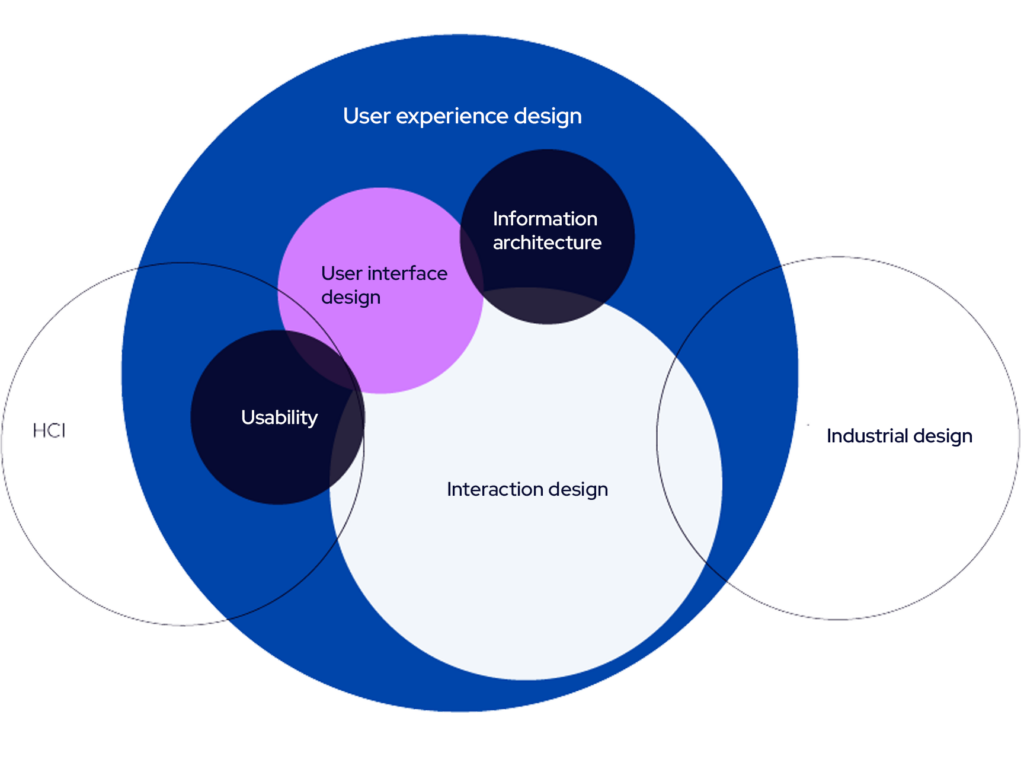
The user interface is, for example, the visible part of a website or application for the end user. Dan Saffer aptly describes the user interface in his book Designing for Interaction as the tip of the iceberg. What is visible on the surface is only a small part of a carefully designed whole.

Areas of user experience design, according to Saffer.

The user interface of a website or application is built from elements such as functionality, the layout of selected components in relation to one another and the screen size, colors, typography, and illustrations. The user experience, on the other hand, is shaped not only by the user interface but also by factors such as the accessibility, usefulness of the service/product, and how and from where the user arrives at the product/service.

User interface design is an important part of user experience design, as it is often the most visible aspect of the entire process. Visual design can, for example, support the detection of important elements in the correct order and help the user interpret the interface as intended. Perhaps due to the significance of interface design, it is sometimes confused with user experience design. However, it is essential to remember that the user interface is not the only part of the user experience. A good interface cannot save a poorly designed experience, but a bad interface can easily ruin an otherwise well-designed experience. The interface can be made visually impressive and distinctive, but usability, accessibility, discoverability, and other factors that impact the overall experience must not be overshadowed.

So, when considering purchasing UX design services, remember that the price tag should include more than just a visual update to the user interface. On the other hand, when purchasing UI design, you cannot expect to solve issues that require a deeper understanding of how the overall experience is shaped. A designer’s job is to question the needs presented by the client. An experienced designer, after familiarizing themselves with the case, will be able to advise on what would be the most beneficial course of action for that specific situation.

Sources:

Saffer, D. 2005. Designing for interaction: creating smart applications and clever devices. Berkeley, CA: New Riders

Sinkkonen, I.; Nuutila, E. & Törmä, S. 2009. Helppokäyttöisen verkkopalvelun suunnittelu. Helsinki: Tietosanoma


What does software development cost?

One of the most central and therefore also one of the most common questions related to software development in terms of investments is: “What does software development cost?” Naturally, this is one of the most critical factors when business decision-makers evaluate the current state and future needs of their digital systems.

Some of the most common challenges related to systems include the following situations:

  1. digital services used by the company are entirely or partially outdated,
  2. systems only partially meet the company’s business needs, or
  3. existing digital systems do not support business scalability.

Digital services, such as web applications or mobile applications, are at their best key enablers for scaling a business and achieving related goals. When it comes to software development, delivering business value is always our top priority. We take it seriously that our clients receive genuine value from the systems we develop.

For us, business value means gaining a comprehensive understanding of the client, their needs, and the system to be developed even before starting the collaboration. Understanding the client, the problem to be solved, and the users of the product or service is therefore a crucial starting point for the partnership. This ensures that the product or service addresses a genuine need, which, in turn, is an essential foundation for making the investment.

In this article, we delve into the question of what software development costs. Since every company’s needs are unique and development is carried out through a wide variety of collaboration models, we cannot provide a very precise estimate of software development costs in this text. However, we aim to address this question at a high level and hope to have the opportunity to discuss your needs in more detail to provide a more accurate estimate of the project’s cost.

What factors influence the cost of software development?

The cost of software development is influenced by numerous factors. The most significant ones are the complexity of the work and the scope of the project, meaning how complex the system being developed is. This includes factors such as the number of features to be developed, the number of third-party backend systems involved, and various technological solutions. Other factors that affect the cost include the size of the team, the experience level of the developers, and the project timeline.

The size of the development team and the collaboration model

The size of the team, including software developers and UX designers, is naturally one of the key factors in pricing. The hourly rate for software development can range between 70 € and 150 €, depending on the consultant’s expertise. UX design typically has an hourly rate in the range of 80–100 €.

Another key factor influencing the cost is the collaboration model we choose as the foundation for our partnership.

If our client company has its own development team and needs extra hands or specific expertise, Identio’s software developer works as part of that team. This type of “additional resource” is an easy alternative to hiring a dedicated software developer. Additional resources are often needed when the in-house team lacks the technological expertise required for the project or when the project aims to prototype the suitability of new technologies for the client’s use. Other situations where consultants can be utilized include boosting efficiency as deadlines approach or ensuring continuity of development work during holiday periods. This is our most common collaboration model, and in such cases, hourly-based pricing often applies.

Additionally, we offer two different approaches where Identio’s own development team creates an entirely new system tailored to the client’s needs. The first approach involves close collaboration with the client, while the second is more of a turnkey solution. In the close collaboration model, we focus on transferring knowledge and skills to the client organization through coaching-oriented software development. In the turnkey solution, on the other hand, we develop a predefined product or service with a more independent approach, keeping the client’s role lighter. This model is well-suited for situations where the goals are clear, and the development team and client are aligned on the system to be developed.

Pricing for both of these models can be either hourly-based or fixed. In the case of fixed pricing, we agree with the client on a price range within which we commit to staying.

Other factors affecting the cost of software development

Several other factors also influence the costs of software development, and these should be considered when planning the project budget. The first key aspect to evaluate is the scope of the project. Are we building a lightweight MVP (Minimum Viable Product), an MLP (Minimum Lovable Product), or a more comprehensive software solution? Smaller projects are naturally more affordable, but the planning, implementation, and testing of larger systems require more resources.

The technologies and platforms used also affect costs: some technologies require specialized expertise, which can increase the project’s price tag. The team composition, tight deadlines, and post-launch maintenance and further development costs are other key variables that should not be overlooked when planning the budget. These factors together determine the appropriate budget to allocate for software development.

How to make software development cost-effective?

Cost-effectiveness in software development begins with a thorough definition phase. When a development project is carefully planned in advance, expensive changes in later stages can be avoided. A comprehensive requirements definition saves both time and money and helps the team focus on what is essential. Additionally, prioritizing the most important features is key, for example, through MVP (Minimum Viable Product) or MLP (Minimum Lovable Product) thinking. This means focusing in the early stages of the project on delivering a minimal yet lovable solution that addresses clearly defined needs.

Through agile development and iterative thinking, the development process can adapt quickly to changing needs and feedback from users. This approach helps allocate the budget to features and elements that are genuinely important from the users’ perspective.

Choosing the right team is also a critical factor in ensuring cost-effectiveness. A team with experience in similar projects can typically deliver high-quality results while managing the project efficiently and smoothly. Cost-effectiveness doesn’t always come from selecting the cheapest provider or partner but from professional work where things are done right from the start.

Well-executed software development delivers long-term value and, most importantly, supports the growth of your business. In contrast, cheap development done with insufficient expertise can ultimately result in costly repairs and rework.

Concrete pricing examples

It is challenging to discuss software development costs with absolute precision, but I hope these examples provide you with a general idea of the expenses involved in software development.

These examples are based on Identio’s pricing and apply to digital products and services tailored and developed to meet your needs, as well as the hourly billing rates of our consultants.

Tailored digital products and services, and consultants’ hourly rates
Medium-sized software: ~30 000–100 000 €
Comprehensive custom software: ~100 000 € +
Software development / IT consultant hourly rate: 80–120 €
UX designer’s hourly rate: starting from 85 €

Software development cost estimate

The cost of software development is highly case-specific, and we hope this article has provided you with indicative information about the scale of the investment. We look forward to discussing your specific needs and exploring what software development might cost in your unique situation.

Contact our sales team, and we’ll help you identify your company’s specific software development needs. Through discussion, we can jointly assess the scope of technical implementations and provide a rough estimate of development costs.


Identio as a technology company

Identio’s software developers specialize in consulting, which means we work closely with our clients throughout the entire process—from designing a digital product or service to its development and maintenance.

We design sustainable software architecture solutions and develop digital products and services with a focus on user-friendliness, scalability, and cost-efficiency. We are also here to assist you with updating and modernizing your existing systems.

6 useful books for Software Consultants

There are a few books I personally recommend to all Identian’s, but especially the software engineers amongst us. The list consists of books about software development and consulting as well as teamwork, leadership, and organization models. All of the books here can also be found in Identio’s library as physical copies, with the exception of Thinking in Systems.

Clean code or The Pragmatic Programmer

Author: Clean code by Robert C. Martin, The Pragmatic programmer by Andrew Hunt and David Thomas

Starting things off with a pair of alternatives. Both of these are pretty solid choices for any software engineer, especially on the early part of their career, but why not later as well.

  • They are solid books in terms of readability. I feel like Software Engineering as a topic does not always produce the most captivating pieces of literature. These books are definitely exceptions.
  • The code examples might not present the most up to date versions of the hippest languages, but the underlying ideas transfer across nicely.
  • I personally read Pragmatic Programmer first and was left with the feeling I could have done with only reading Clean Code, but neither of these books is a waste of time.

Leadership and self-deception: Getting out of the Box

Author: The Arbinger Institute

This Arbinger Institute’s book is one of my personal go-to books regarding teamwork and cooperation in pretty much any setting.

  • Describes some of the mindsets that are easy to fall into while working with other people.
  • The book is pretty easy to read, being a relatively short book written in the format of a story.
  • Worth a second and even a third read. The content is nothing surprising but it’s easy to fall into the routines of the Box that the book talks about.

The Trusted advisor

Author: David H. Maister

This book provides great ideas regarding consulting and paints the path to becoming what the book paints as the epitome of a consultant – The Trusted Advisor.

  • The book takes you on a journey to building trust between the advisor and their clients in a myriad of ways.
  • Provides helpful stories and analogies from the authors years of experience.
  • Reflects on a lot of similar thoughts from Leadership and self-deception.

Thinking in systems

Author: Donella H. Meadows

Great book about being a systems thinker and finding a systems thinking mindset to solving problems and viewing the world around you.

  • Systems thinking can make it easier to understand how different abstractions in the real world work.
  • The systems thinking mindset can be quite easily applied to software architecture where we’re dealing with some of the more clearly defined systems.
  • There’s something dogmatic to the book and it’s not always the easier read, but once you’re done with it, it’s hard not to see the world around you as a system of systems.

Reinventing organisations

Author: Frederic Laloux

This book regarding teal organisations takes a look at how different types of organisations co-exist and work, including some of the reasoning and models behind their ways of ticking.

  • This book in specific is rather dear to Identio as a company, considering our processes and ways of working are heavily modelled around the ideas presented in this book.
  • Provides good insight into how organisations might manage and function in a flat hierarchy setting that benefits expert organisations.
  • Nice compact read, with a separate illustrated edition.