Category: Blog Post (EN)

Mitä on ohjelmistoarkkitehtuuri?

What is software architecture and why is it important?

Software powers almost every aspect of our everyday life. For businesses aiming to create their own software, understanding the foundational concepts is crucial. One such fundamental concept is software architecture. But what is software architecture?

The software industry itself has long struggled to precisely define software architecture. There is a famous quote by a computer science professor and writer Ralph Johnson that is often used to depict software architecture: “Architecture is about the important stuff…whatever that is.” and in my opinion this is probably the simplest, yet accurate answer one can give. If we want to open this idea a bit more, let’s look into different aspects of software architecture.

The software architect role has responsibilities on a substantial scale and scope that continue to expand. Earlier the role has been dealing with solely technical aspects of software development, like components and patterns, but as architectural styles and software development in general has evolved the role of software architecture has also expanded. Constantly changing and emerging architecture styles such as microservices, event driven architecture and even the use of AI, lead the architect to the need for a wider swath of capabilities. Thus, the answer to “What is software architecture?” is a constantly moving target. Any definition given today will soon be outdated. In software development change is the only constant. New technologies and ways of doing things are emerging on a daily basis. While the world around software architects is constantly changing, we must adapt and make decisions in this shifting environment.

Generally speaking, software architecture is often referred to as the blueprint of the system or as the roadmap for developing a system. In my opinion the answer lies within these definitions, but it is necessary to understand what the blueprint or the roadmap actually contain and why the decisions have been made.

What does software architecture mean?

To get to the bottom of what software architecture actually contains and what should be analyzed when looking at an existing architecture, I like to think about software architecture as a combination of four factors or dimensions: the structure of a system, architecture characteristics, architecture decisions and design principles.

The structure of a system refers to what type of architecture is being used within the software, for example vertical slices or layers, microservices or something else that fits the need in a particular case. Just describing the structure of a system does not, however, give a whole picture on the overall software architecture. Knowledge of architecture characteristics, architecture decisions, and design principles are also required to understand the architecture of a system or what the requirements for the system are.

Architecture characteristics are aspects of software architecture that need careful consideration when planning overall architecture of a system. What are the things that the software must do that are not directly related to domain functionality? These are often described as the non-functional requirements, as they do not directly need knowledge of the functionality of the system yet are needed for the system to operate as required. These contain aspects like availability, scalability, security and fault tolerance.

The next piece in the puzzle is the architecture decisions. As implied by the name, these define the rules that specify how a system should be built and what is allowed and what is not. Architecture decisions create the boundaries within which the development team must work and make their decisions related to the development work. A simple example would be to restrict direct access to databases for different services and allow access only through an API. As we are embracing the change, these rules will be challenged, and careful consideration of trade-offs should always be conducted when discussing changes to the architectural decisions.

The final dimension in software architecture is design principles. These can be thought of as guidelines for the development work and not as set rules that must be followed. For example, if setting an architecture decision cannot cover all cases and conditions, a design principle can be set to provide a preferred method of doing things and give the final decision to the developer for the specific circumstance at hand.

Why is software architecture important?

It depends. Everything in architecture is a trade-off, which is why the answer to every architecture question ever is “it depends.” You cannot (or well, should not) search Google for an answer to whether microservices is the right architecture style for your project, because it does depend. It depends on the initial plans you have for the software, what the business drivers are, what the allocated budget is, what the deadline is, where the software will be deployed, skills of the developers, and many many other factors. The case for every single architecture case is different and each faces their own unique problems. That’s why architecture is so difficult. Each of these factors need to be taken into consideration when tackling an architecture case and for every solution, trade-offs need to be analyzed to find the best solution for your specific case.

Architects generally collaborate on defining the domain or business requirements with domain experts, but one of the most important result is defining the things the software must do, that are not directly linked to functionality of the software. The parts we earlier mentioned as architecture characteristics. For example, availability, consistency, scalability, performance, security etc.

It is generally not wise to try to maximize every single architectural characteristic in the design of a system, but to identify and focus on the key aspects. Usually, software applications can focus only on a few characteristics, as they often have impact on other aspects. For example, an increase in consistency, could cause decrease in availability; In some cases, it can be more important to show accurate data instead of inaccurate, even if it means parts of the application would not be available. In addition, each characteristic to be focused on increases the complexity of the overall design, which forces trade-offs to be made between different aspects.

Architectural planning is all about the trade-offs in different approaches. To determine which are the optimal solutions for the case at hand and understanding why applications should be built in a specific way and what it means, is what makes software architecture so valuable.

Types of architecture

When designing software, there is a plethora of architectural patterns available, each with its own strengths and weaknesses. Some of the most common types include:

Monolithic Architecture: A single, unified codebase where all components are tightly integrated. It’s simpler to develop initially but can become a burden as the software scales. While it offers straightforward development and deployment, maintenance can be challenging when the application grows, as even minor changes may require rebuilding and redeploying the entire system.

Microservices Architecture: This divides the software into small, independent services that communicate with each other. Each service handles a specific function and can be developed, deployed, and scaled independently. This architecture is great for scalability and flexibility but requires careful management of communication between services and adds complexity as the system grows.

Layered Architecture: A traditional approach where the system is divided into layers, such as presentation, business logic, and data access. Each layer handles specific tasks, making it easier to manage and test. However, it may become rigid and harder to adapt for complex or rapidly evolving systems.

Event-Driven Architecture: Focused on responding to events (e.g., user actions, data updates), this pattern is useful for systems that need to be highly responsive. It enables real-time processing and scalability but requires careful design of event flows to avoid bottlenecks or data inconsistencies.

Serverless Architecture: A cloud-based approach where the application’s backend runs on-demand without needing dedicated servers. It reduces operational costs and simplifies scaling but is highly dependent on third-party cloud providers, which could lead to vendor lock-in.

Each type of architecture comes with trade-offs, and the best choice depends on your business drivers, development team, deadlines, budget and many other factors. For example, startups might opt for monolithic or serverless architectures for faster time-to-market, while large enterprises may prefer microservices to handle complex, large-scale systems.

Possibilities and challenges

Possibilities

A well-planned software architecture opens up numerous opportunities for your business:

  • Customizable Solutions: Tailor the software to meet unique needs and adapt to changing demands. For example, modular architecture allows specific features to be added or upgraded without affecting the entire system.
  • Faster Market Entry: Modular architectures, like microservices, enable faster deployment cycles and iterative improvements. This can help businesses roll out features quickly to stay ahead of competitors.
  • Integration: Seamlessly connect with other tools, platforms, and APIs. This is especially important for businesses looking to integrate with third-party services, such as payment gateways, CRM systems, or analytics platforms.
  • Innovation: With the right architecture, your business can experiment with emerging technologies like artificial intelligence, integrating them into existing systems with minimal disruption.
  • Team Expertise: With well-planned architecture that fits the skills of the development team, development work, onboarding and delivering a quality product becomes easier.

Challenges

However, there are also challenges to consider:

  • Initial Complexity: Designing well-thought-out architecture requires expertise and time. Teams need to anticipate future needs while ensuring current requirements are met, which can be difficult without experience.
  • Cost: The upfront investment in architecture planning can be significant, though it’s often worth it in the long run. Costs include hiring experienced architects, acquiring tools, and potential delays in the project timeline during the planning phase.
  • Evolving Technologies: Staying up to date with new tools and frameworks can be overwhelming. The technology landscape changes rapidly, and businesses must ensure that their chosen architecture doesn’t become obsolete or incompatible with future advancements.
  • Team Expertise: Implementing complex architectures like microservices or event-driven systems may require specialized skills. Without proper training or hiring, teams may struggle to deliver a high-quality product.

By working with experienced developers or consultants and regularly reviewing architectural decisions, these challenges can be mitigated. The right approach ensures your software remains robust, adaptable, and aligned with your long-term goals.

Summary

Software architecture is often referred to as the blueprint of the system or as the roadmap for developing a system. Often the answer lies within these definitions, but it is necessary to understand what the blueprint of the roadmap actually contains and why the decisions have been made. The why is more important than how.

While precisely defining software architecture is difficult, it can be seen as a combination of four factors: the structure of a system, architecture characteristics, architecture decisions and design principles.

In the end architectural planning is all about the trade-offs in different approaches. To determine which are the optimal solutions for the case at hand and understanding why applications should be built in a specific way and what it means, is what makes software architecture so valuable.


Read also: Systems thinking in software development – mastering complex systems

MQTT architecture

MQTT: the lightweight IoT messaging protocol explained

MQTT is a publish/subscribe messaging protocol that allows for communication between any program or device that implements the protocol. It is lightweight, open, simple, and designed so as to be easy to implement. These characteristics make it ideal for use in Internet of Things (IoT) and Machine to Machine (M2M) contexts, typically constrained environments where a small code footprint is required and/or network bandwidth is at a premium.

We recently used MQTT as the main driver for communication in a project where we developed a kind of home automation platform. MQTT facilitated communication between a web UI, a number of microservices and PLCs and we have been delighted with how well the system has worked.

The goal of this post is to provide a quick introduction to MQTT’s core architecture and concepts. We will consider the topic of security outside the scope of this post (though some features are mentioned in passing), but I will say it is very much at the forefront in the design of MQTT and provides a number of means to make your implementation secure.

A brief history of MQTT

MQTT started off as a proprietary protocol in 1999. It was used by IBM internally until they released MQTT 3.1 as a royalty-free version in 2010. MQTT has been an OASIS standard since 2013 and the specification is managed by the OASIS MQTT Technical Committee.

The protocol’s swiftness, simplicity, efficiency and scalability – both in and of itself but also compared to other protocols – have not gone unnoticed and over the years it has been widely adopted and is generally used in environments where real-time access to data from devices and sensors is critical. Use cases would include for example smart homes, transportation and manufacturing, but notably even Facebook has used the protocol in their Messenger app.

But where does the name come from?

The “MQ” in “MQTT” originally referred to the IBM MQ product line, where it stands for “Message Queue”. IBM referred to the protocol by the name “MQ Telemetry Transport” in the version 3.1 specification we mentioned above. Looking up MQTT on the internet today, you will find that the four letters are often expanded to “Message Queuing Telemetry Transport”. While this name is relevant from a historical standpoint, the Technical Committee agrees that at least as of 2013 “MQTT” does not stand for anything.

MQTT Architecture basics

Client

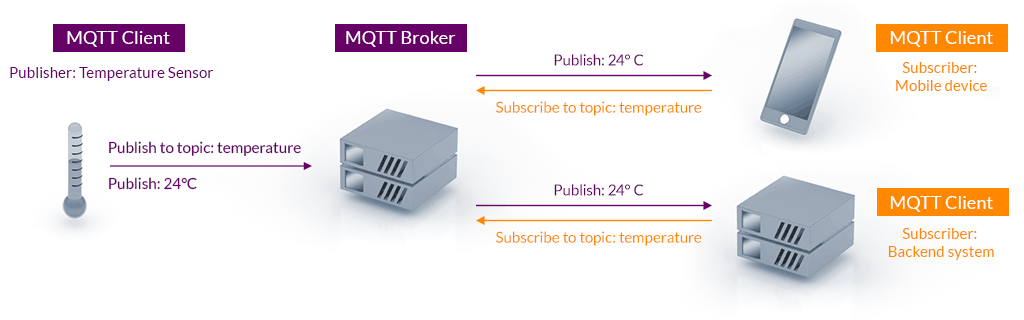
The MQTT client can be any program or device that implements the MQTT protocol. Clients connect to a server that handles all message passing, where each client is identified by a unique client ID. A client can publish messages that other clients may be interested in and likewise subscribe to request messages that it is interested in receiving.

Clients are decoupled by design and do not communicate directly with each other. All communication is brokered by a server component which sits in between clients and handles the routing of messages. This decoupling is the foundation of MQTT’s efficient one-to-many capability.

Server

An MQTT server (also commonly “broker”) is responsible for managing which clients are subscribed to which topics, receiving messages published on a particular topic and forwarding that message to any client subscribed for updates. When the connection between a client and server is lost, the server is also responsible for caching the message and delivering it to the client when the connection is re-established.

The server handles security implementation. For example clients can be required to authenticate or to connect using TLS. The server can also restrict access to topics using general rules, or even making rules for specific client IDs.

A demonstration of the MQTT architecture

Topics

All communication in MQTT is grouped into topics. Clients can publish messages to topics and subscribe to receive messages from others. A topic can be any string and is intended to group subjects of common interest, for example, sensor updates would be published to a topic. Topics are hierarchical, which means you will typically see topics structured as level1/level2/level3 where the slash acts as a separator for the levels. Topic subscriptions support wildcards, a powerful and convenient feature.

A subscription using a single-level wildcard (+) will result in a subscription that matches any topic that contains an arbitrary string in place of the wildcard. Subscribing to a topic such as level1/+/level3 means you will be subscribed to level1/foo/level3, level1/bar/level3 etc.

The multi-level wildcard (#) covers multiple topic levels and must be the last character in the topic. Subscribing to the topic level1/# would result in a subscription to level1/foo , level1/bar/baz etc. Essentially the subscription matches any topic that begins with the pattern preceding the wildcard character. As you may have guessed, subscribing to just # creates a subscription to all topics.

Reliability

Many clients connect to servers over unreliable networks, which necessitates the ability to recover gracefully from network outages and other such failures. This is what MQTT’s quality of service (QoS) addresses. QoS functions as an agreement between the message sender and receiver that defines the level of delivery guarantee for a specific message. The protocol defines three levels of quality of service.

  • QoS 0: at most once delivery – messages can be lost and neither client nor server take any additional steps to confirm delivery.
  • QoS 1: at least once delivery – messages are confirmed and re-sent if necessary. As messages may be delivered more than once, the receiving client should be able to handle duplication.
  • QoS 2: exactly once delivery – messages are confirmed and re-sent until they are received by the subscriber exactly once. This level is suitable for scenarios where neither message duplication nor loss is acceptable.

Note that the QoS defined by a publisher and subscriber may differ. The publishing client might publish its message using QoS 2 while the subscribing client defines QoS 1 for its subscription. This poses no issues, as the server will simply use the QoS defined by the recipient to deliver the message.

A higher QoS level comes with the cost of higher overhead. This along with the tolerance for data loss and duplication are important factors to take into account when choosing the appropriate level for your use case.

Implementations

A large number of both proprietary and open source MQTT server implementations are available. You will also find that readily available MQTT client libraries exist for many popular programming languages (Python, Java, JavaScript, C#). Development-oriented readers may check out for example mqtt.js and aiomqtt, both of which make getting a client up and running a breeze.

MQTT does not define a payload specification. This affords the implementing party immense freedom, with the valuable benefit of flexibility to transfer payloads between older and newer systems. On the other hand it can prove a challenge in terms of ensuring compatibility between clients, as communication is essentially based on silent agreements.

Conclusion

This has been a short introduction to MQTT and has hopefully provided insight into why it has become the de facto messaging protocol for IoT and M2M environments. We’ve learned about the the concepts of clients, topics and servers in MQTT in an effort to give you a head start in understanding the protocol’s messaging architecture. A brief look at the levels of quality of service gave us an understanding of how the protocol approaches the issue of reliability in communication.

We’ve seen that MQTT is commonly used in IoT and M2M contexts, but it need not be pigeonholed into those few contexts only. The versatility of potential use cases is one of MQTT’s many appealing features. The protocol is ideal for both small hobby projects and larger-scale applications. Due to the protocol being payload agnostic, the structuring of your payloads will play a large role in whether MQTT is a suitable tool for your needs.

Sources

MQTT Version 5.0. Edited by Andrew Banks, Ed Briggs, Ken Borgendale, and Rahul Gupta. 07 March 2019. OASIS Standard. https://docs.oasis-open.org/mqtt/mqtt/v5.0/os/mqtt-v5.0-os.html. Latest version: https://docs.oasis-open.org/mqtt/mqtt/v5.0/mqtt-v5.0.html.
https://mqtt.org/assets/img/mqtt-publish-subscribe.png
https://www.hivemq.com/blog/mqtt-essentials-part-5-mqtt-topics-best-practices/#heading-what-are-mqtt-wildcards-and-how-to-use-them-with-topic-subscriptions
https://www.hivemq.com/blog/mqtt-essentials-part-6-mqtt-quality-of-service-levels/
https://groups.oasis-open.org/higherlogic/ws/public/document?document_id=49028
https://www.hivemq.com/blog/mqtt-essentials-part-1-introducing-mqtt
Enginering at Meta: Building Facebook Messenger

Kestävä ux-suunnittelu, kuvituskuva

The era of sustainable UX design: a perspective on designing responsible digital products

Designing digital products has a relatively short history. Since the advent of graphical user interfaces in the 1980s and the widespread availability of computers, the design of digital products has focused on the users rather than the machines that implement them. For the last 40 years or so, the industry has been guided by the principles of user-centred design. But is the era of user-centred design now over?

In this blog post, I talk about sustainable UX design, and why we should move from user-centred design to sustainable design. I will also explain what it means in practice.

What is sustainable UX design?

The environmental impact of digital products is more difficult to understand than that of physical products. We all know that it takes cotton to produce a t-shirt, which in turn takes a huge amount of water to grow. But do we think about how much energy it takes to charge the online shop where we order the t-shirt? Or what difference does it make whether we order the shirt directly to our doorstep or to the nearest parcel machine? A single download may seem insignificant, but when we are talking about tens of thousands of daily visitors to a website, the energy consumption is significant.

…the internet – including data centres, telecoms networks, and end user devices like phones and laptops – uses a lot of electricity. In fact, if you add it all together, the internet uses roughly the same amount of electricity as the UK, one of the world’s largest economies.

– Tom Greenwood, founder of Wholegrain Digital and author of Sustainable Web Design

The European Climate Pact website claims that emissions from digital technologies in the EU are comparable even to those from aviation. In focusing on satisfying users’ needs, we may have overlooked the wider impact of the products we design.

Sustainable UX design is when the design process takes into account the impact of the product on the environment and people (i.e. beyond the users of the product). While user-centred design aims to meet the needs of users as much as possible and create a pleasant experience for them, sustainable design aims to create products that have a minimal impact on the environment and are fair and equal to users. In the sustainable design process, environmental impact, fairness and equality weigh more than meeting users’ needs and preferences. Fortunately, these are not necessarily mutually exclusive, but can contribute to each other.

Accessibility and equality are part of sustainable design

Sustainable UX design takes into account social impacts in addition to environmental impacts. The principles include making products not only accessible, but also equitable and ethical – in other words, they put the well-being of users and all people before the company’s profit. Sustainable design could therefore be considered responsible design.

Digital products should not make unfair assumptions or reinforce existing stereotypes and prejudices. Designers can influence this from the very beginning of the process, for example by recruiting participants from different backgrounds for user research. When designing user interfaces, the designer should pay attention to factors such as the illustrations and icons they use. For example, does a handshake icon necessarily need to have cufflinks?

An ethically designed product prioritizes the well-being of users over the company’s objectives. For example, is it worthwhile to design a product that users will spend as much time with as possible? Or could it have an impact on users’ mental health or sleep quality? Increasing conversions is often a goal for companies, but it can also encourage designers to use so-called deceptive or dark patterns. Deceptive design, as the name suggests, misleads users to act in the company’s interest, for example by manipulating the user’s emotions or by deliberately making it difficult for them to make a choice that is unfavourable to the company. While such practices may seem effective in increasing conversions, for example, they often pay off in the long run in terms of user dissatisfaction and poor brand loyalty.

Environmentally conscious design

There are always additional actors (human and non-human) involved besides our users — directly or indirectly. We must stop designing solely for our users and instead always understand and review our work within the systemic context.

– Thorsten Jonas, founder of Sustainable Design Network

Digital products always “live” in a context and their impact extends beyond their users. Responsible designers also take into account the indirect effects of the decisions they make, both on users and on other stakeholders. Let’s take Uber and Bolt as examples. What impact will the increased use of these applications have on the use of public transport and therefore emissions? How can users be encouraged to make more environmentally friendly choices, such as electric cars or carpooling? Or how important is it that drivers keep their cars idling while waiting for passengers? Designers cannot endlessly consider the impact of products, because they also need to get something done. But it is essential for a designer to have the ability to question things. Ultimately, design decisions have an impact not only on the environment but also on society.

Probably the most obvious way to improve the environmental performance of a digital product is to influence its energy consumption and the source of the energy it consumes. For example, we can favour data centres powered by renewable energy. The energy consumption of a product can be influenced by the use of colours, font choices and efficient design that requires fewer server requests and the processing of large amounts of data. In general, dark colours consume less energy than light colours. However, this is only true for modern OLED displays, and even on those, the greatest impact is achieved when the brightness of the display is set to maximum. According to an article in ZDNET, Google has done some research and reports, for example, that Google Maps night mode has reduced screen power consumption by 63% compared to normal mode.

The designer can also make a significant contribution to product sustainability by guiding users to make more responsible choices. At its simplest, this can take the form of information sharing with the user. In the e-commerce ordering example I presented earlier, the most environmentally friendly delivery method could be set as the default choice for all users.

A further way to ensure eco-friendliness is to consider the devices on which the digital product will be used. As a rule of thumb, we should design products that also work with old equipment, so we are not contributing to electronic waste.

Artificial intelligence and responsibility

Especially at this moment, when we are exploring the possibilities of AI in the design of digital products, it is important to pay attention to responsibility and sustainability. AI is known to suffer from biases and to draw the wrong conclusions when interpreting historical data. We need to actively work to address such ethical challenges. AI has the potential to improve energy efficiency and reduce environmental damage in many sectors, such as agriculture and construction. Nevertheless, the use of AI itself requires significant energy, so the incorporation of AI-based features into products needs to be carefully considered.

A widely used, but absolutely valuable example of the detrimental consequences of design decisions, particularly in relation to AI, is social media applications. We live in a polarised society where people find it difficult to tolerate views that differ even slightly from their own. Content recommendation algorithms on social media are wrapping users ever more tightly in their own bubbles.

Stand out from the competition with sustainable UX design

Investing in sustainable design can also be seen as a branding exercise. As mentioned, accessibility is part of sustainable design and accessible products are available to a wider audience than non-accessible products. Sustainably designed products and the communication of the process can appeal in particular to environmentally aware users, thus strengthening the brand’s position in their minds. The same applies to users who value fairness and equality.

User-centricity in UX design is still important and the principles behind it should not be forgotten. However, at Identio we have started to pay more attention to the sustainability and responsibility of the products we design. Our design principles include a section on “Sustainability” and our designers have created a sustainable design checklist to support their work. We want to play our part in building a more sustainable and better digital future, and we believe that sustainability is also an important value for many of our customers and an asset for success in the marketplace.

Sources:
Tom Greenwood – 20 ways to make your website more energy efficient – Wholegrain Digital
European Climate Pact – Going digital – good or bad for the climate?
Thorsten Jonas – The 11 principles of Sustainable UX – SUX – The Sustainable UX Network
Emilyann Gachko – Sustainable UX Design: Principles and Practices for Eco-Friendly Digital Products
Nielsen Norman Group – Deceptive Patterns in UX: How to Recognize and Avoid Them
World Economic Forum – AI and energy: Will AI reduce emissions or increase demand?


Read also: UI and UX – what is the difference between them?

Web Applications: How We Build Minimum Lovable Products in 2025 – Launching the Product

In this third part of the blog series on Minimum Lovable Products, we delve into the lifecycle phase where the “minimum” in MLP has been achieved, and you are at the point where the product should be launched, developed further, and/or maintained in production.

Once the minimum lovable product has been built and perhaps already in use, it is time to build on the minimum to reach a more fleshed-out product with increased technical robustness and all the nice-to-have features that were skipped during the initial development.

Depending on the product, the focus might be on ensuring that a one-and-done product is stable and maintainable for the rest of its lifecycle or, as more often is the case, continuing the development and building on the lovable foundation of the product.

Launching the product

If you’ve read our earlier posts, the initial development process has heavily involved its different users, and with a lovable product, these users can be your best ambassadors for the software. This may come in the form of expanding the adoption of the product in a business setting or as early adopters of a consumer application.

While many business decisions at this stage are technical in nature, scalability deserves some special attention. If your product becomes successful, you’ll need to address infrastructure challenges. “Under the hood” issues like load balancing and increased data volumes can slow down response times, potentially eroding the lovability that worked so well with your test group. These are common software challenges, but when you’re banking on lovability, even minor UX disruptions can damage your reputation with crucial early users. Whether through word of mouth or direct experience with a new tool, poor first impressions are particularly difficult to overcome.

There is also a chance that the user testing that yielded the lovable end result might have had some unrealized bias that doesn’t reflect the wider real-world user groups. Here you have to have your fingers on the pulse and find out if the user test representation is a feasible user group in the real world or if you need to pivot somehow — what are the lovable and unlovable things about your product; what can be salvaged and what should be scrapped.

Maintaining lovability and developing it further

Lovability is a context-specific quality. When software reaches the maintenance stage of its lifecycle, it should be clear what the lovability is actually based on. This might mean “under the hood” technical aspects such as fast service times, which would prompt special care to the infrastructure upkeep and scalability.

Technical debt is a tricky thing that, when unchecked, can stack up in an exponential manner and become a blocker in development. This means that you might not be able to ship new updates and features on a desired schedule. Here you have to keep in mind what makes your product lovable: at what point will shortcuts taken in initial production come back to haunt you in a big way? It might very well be worth it to change that quick and dirty database implementation to a distributed, scalable system if it means your lovable product won’t fold over if and when your lovable software gathers traction beyond the initial user base of early adopters. On the other hand, a lovable product might gather eager users demanding new features, and delays may infuriate some users. Examples of this occurring are often found in the games industry.

Often, however, it is the UX that might go through some changes with continuous development. With the case of an ever-developing software product, there is a temptation to add more and more features for different use cases or connections to different outside services. The bloat can be an issue that dilutes the lovability of the UX, devolving a slick and simple UI to a swamp of elements and options. However, additional features may well be what the users want or need. There are ways of integrating new elements without compromising the lovability. Depending on the case, this might mean customizable UI for the user or separating less used features to optional views.

Even with the temptation to add more features, one should also take into consideration whether they can be added as lovable features. If the main features of your product are crafted with design, love, and care, a clunky feature will stick out like a sticky spacebar in a keyboard. On the other hand, there are business decisions to be made: are the features worth the clunkiness? There certainly are cases where a solid core product and fluid basic use cases make the product worth using, even if there are some more tedious but seldomly used features.

The path forward

Often, minimum lovable products are aiming for growth. There are many ways to achieve this, but each option has pitfalls and requirements. Keeping the app lovable is in itself a business decision that involves costs but also might help you retain the competitive edge. In the cases where you are building software for a predetermined use case, such as a public transport ticket and route service, the decision whether or not to emphasize the lovability and ease of use in continuous development affects the lives of your users and, by extension, can be the best reference of your work quality.

In closing

Building lovable products, even minimum ones, is a commitment of time and effort. Software craftsmen may be tempted to preach that MLPs should be the starting point of every software product, as building nice things is often more appealing to them.

The truth is, however, that sometimes the quick and dirty solutions or disregarding the polishing may be the most effective option, such as in cases where the users will not care about the UI visuals but just want to get the job done. MLP is not the solution to every software you’re going to build, but whenever the case is that you have to win users over and retain them, switching the mindset to building a lovable product might be the right choice.

With the end of this series, we hope to have provided you with insights regarding efficient product development in a lovable fashion. If you’ve read through these all, we think you might benefit from getting in touch with us to evaluate whether or not we might be able to help you deliver something lovable to your users.


Part 1: Web Applications: How We Build Minimum Lovable Products in 2025 – Gaining a Solid Understanding
Part 2: Web Applications: How We Build Minimum Lovable Products in 2025 – Building a Lovable App
Part 3: Web Applications: How We Build Minimum Lovable Products in 2025 – Launching the Product

Systeemiajattelu ohjelmistokehityksessä – Systems thinking in software development

Systems thinking in software development – mastering complex systems
We are living in the age of systems, where the complexity of these systems is constantly increasing, and problems are becoming more holistic, impacting entire structures rather than isolated parts. Solving complex issues requires more than just straightforward, linear thinking. We need the ability to think broadly, to understand relationships between elements, and see that often-referenced “bigger picture.” While linear thinking is a useful starting point, it often isn’t enough. Systems thinking introduces a new perspective for examining problems and finding solutions.

Systems thinking is not just a skill to be learned—it is a set of practices and perspectives. In fact, it could even be considered a way of life. It cannot be fully grasped by reading alone, much like you can’t learn to play golf simply by reading about it. It must be experienced and practiced. Systems thinking demands that we truly seek to understand.

Linear thinking

Many of us think linearly without even realizing it. This approach is so deeply ingrained that we don’t recognize it as just one of many possible ways of thinking. Linear thinking is predictable and based on specific, often learned, procedures. It sounds appealing—especially in a field like software development, where the goal is often to construct modular and highly efficient components that fit neatly into a larger system.

Linear thinking is indeed a useful and efficient approach in many situations. It provides clarity and control, which are especially valuable for software designers in their work. However, when we begin to consider more complex systems and the relationships between their parts, it becomes essential to broaden our approach to thinking.

The shift towards systems thinking

Designing complex systems is challenging, and the problems that arise increasingly affect the entire system and become more multifaceted, making linear thinking insufficient to achieve the best possible outcome. Solving system-level issues requires new perspectives and tools.

Let’s consider a simplified example. If we plant seven seeds, we expect to harvest seven fully grown plants after x days. If a deer eats one of the plants, we build a fence to prevent further damage and proceed to harvest the remaining crop. This is how we often approach software project planning as well.

In reality, things are not this simple. Sometimes, we end up with nine plants because they may continue to grow into the following year. Other times, there may be no harvest at all. The cause could be rabbits, deer, too much rain, a lack of it, or even excessive cold. The outcome is almost always a combination of many factors, interacting with each other in unpredictable ways.

Since systems are rarely fully controllable and their behavior is often unpredictable, we cannot approach more complex scenarios by thinking solely in a linear way.

Systems thinking requires effort – but it is worth it

Unfortunately, nonlinear approaches are almost always more difficult than linear ones. Systems thinking doesn’t make life easier, but it makes you more effective. It enhances your ability to tackle tough challenges, improves decision-making quality, and helps you identify what the real problems are, versus what are merely symptoms of something else. Through systems thinking, you can find and focus on the true signal amidst all the noise.

In systems thinking, however, it’s about more than just solving problems. At its core, it’s about understanding—the ability to grasp the entire context in which the problem occurs. This requires continuous learning, and most importantly, an awareness of how much you still don’t know. One of the most valuable qualities of a systems thinker is the recognition that they don’t know everything.

How to recognize a systems thinker?

A good systems thinker recognizes the strengths and weaknesses of linear thinking and knows when to apply a linear approach and when to view things from the perspective of the entire system.

In systems thinking, it is important to recognize that technical and social systems are almost always intertwined. One must understand the context in which they operate and how technical solutions and the people involved interact with each other, striving to view the situation from multiple perspectives.

The most important feature of systems thinking is the ability to continuously learn and adapt. A good systems thinker is also self-reflective and aware of their own mental models, reactions, and potential misjudgments. In systems thinking, the goal is to increase awareness of one’s own thinking and help teams and organizations understand how shared processes, patterns, and decisions impact the system as a whole.

A few characteristics of a systems thinker:

  • Thinks about thinking.
  • Understands and recognizes the properties of both linear and nonlinear thinking, and knows how to choose the best approach for each situation.
  • Can design solutions that take into account the context and the needs of the entire system.
  • Understands that people are part of technical systems.
  • Is able to seamlessly switch perspectives when searching for solutions.
  • Always strives to improve their own skills.
  • Can understand and identify root causes of system-level problems and solutions.
  • Can communicate and, most importantly, justify ideas and change proposals.
  • Can understand how interdependent and interconnected parts create wholes, and how to best leverage these dependencies.
  • Can create well-founded models and concepts to support decision-making.
  • And above all, accepts that uncertainty is welcome, natural, and an inevitable part of life.

Software developers as part of a system

Software is not just technical; it is, in fact, a socio-technical system. In short, the way we think, communicate, and work is closely tied to how software evolves. When both the technical and social components of a system work well together, the system often becomes greater than the sum of its parts.

If we want to improve a software system, we must first identify how the team working on the software thinks about it and, if necessary, work to change that mindset. The integrity of the system—how well both the technical and non-technical parts work together—is crucial. When ideas and concepts are aligned at the system level, the systems serve their purpose more effectively. Small changes in mindset can lead to significant improvements in the software system.

When this integrity is lacking, we encounter issues such as data silos, inefficiencies in cross-team collaboration, quick fixes, software incompatibility, and technical debt, all of which hinder the development and maintenance of the system.

Relationships are system design

In systems thinking, understanding relationships is key. A software system only becomes a system when its components interact with each other. Three separate microservices in the cloud are not yet a system; these software components only transform into a system when there are dependencies and relationships between them.

Similarly, a development team can be considered a system when its members work together and have relationships that support a shared goal.

Linear approaches, where strategy comes from the top and teams simply execute it, are insufficient in a complex, systemic world. Organizations must understand that changes affect different parts of the system in different ways, and that the success of change depends on our ability to design and build effective relationships within the system.

Strategic changes, such as digital transformation, modernization, or even the shift from a monolithic software architecture to microservices, cannot be a top-down process because the change itself is not linear. If such a change is approached only with linear thinking, the path will be long and rocky, and the outcome is unlikely to result in anything truly sustainable. While the process may be completed, it’s likely that the system after the changes will not be very functional.

In summary, systems thinking is not easy, but it is essential for success in complex, nonlinear environments. By learning to view situations from the perspective of the entire system and understanding the context, we can create sustainable solutions that best serve both technical and social goals.

A bright, abstract illustration with a large black-and-white gear, purple plant shapes, and swirling lines on a yellow background. The title reads "Minimum Lovable Products in 2025 – part 2.

Web Applications: How We Build Minimum Lovable Products in 2025 – Building a Lovable App

When we feel we have sufficient understanding of the people we’re working with, the problem we’re solving and the people who will be using the product, we’re ready to get started. We like to build software products for our clients in an iterative way.

Previously, we have figured out the things that have the highest priority for the success of the product and the most challenging technological issues we have to face in order to get there. We don’t tackle these straight away, but rather begin our investigation while setting up the wireframe for our client.

Picking the Right Technologies

We’ll always consider what existing software services the client is running currently. Especially if we’re integrating into some existing services. When we’re building products for the web, especially from a starting point of zero, we think at this moment Next.js is the best starting point.

We’re usually pretty agnostic when it comes to technology. Pick the technology for the right project and the right use case is a common mantra in software engineering that we like to abide by and even in zero-to-one product development, there are special cases where you might argue for a better selection.

Next.js gives you a lot out of the box thanks to its vast templating library supported by its developer Vercel. When we’re building a preliminary version of the product, we want to focus on delivering the critical features that make your product valuable and highly usable at the time of the launch. We’ve worked with Next.js on multiple projects with great results that allow us to focus on solving the clients problems, rather than spending time in the choice of technology.

Other technical choices

Most software products that matter require a database that we tend to pick based on your business requirements. For the most common approach, we’ll recommend an SQL database like PostgreSQL for its good set of features and operational excellence. There’s only the rare case where Postgres does not provide your initial product with what you’re looking for.

Alternatives to Next.js

We have experience working with both SvelteKit and Remix, which provide equally lucrative starting points through good template selection. Next’s number of ready templates is generally larger and allows us with a better selection of alternatives.

Some clients might have stronger opinions in terms of selection and there are some special cases where other technologies give you a better starting point through better integration to your existing software.

Building something Lovable

A lovable product is the extra effort that differentiates your product from the competitors or makes your users adopt the new product without complaints. Going the extra mile from MVP to MLP means designing user flows to be simple and intuitive. The first iteration should be simple and focused; additional features can be added later.

A classic MLP example in the software sphere is the dating app Tinder; the swiping right or left UX is widely regarded as the feature that set it above the rest and has even become a commonly used term for (dis)agreeing or (dis)liking things. Adding functionality to connect Spotify, instagram and such while nice features, surely weren’t the main focus when the dating app was in it’s infancy. The main goal is to build a functional solution to a user need; not just a technically plausible way of doing it, but an enjoyable one.

We can circle back to our earlier explanation of a Minimum Lovable product to emphasize our point.

Minimum Viable Product

  • Rudimentary proof of concept-level skeleton.
  • Simple feature set to appease requirements.
  • Allows users to test an idea but usually lacks traction.

Minimum Lovable Product

  • All of the above.
  • Fleshed out User Experience in terms of primary workflows.
  • Evokes positive emotions in the user.

What does development look like

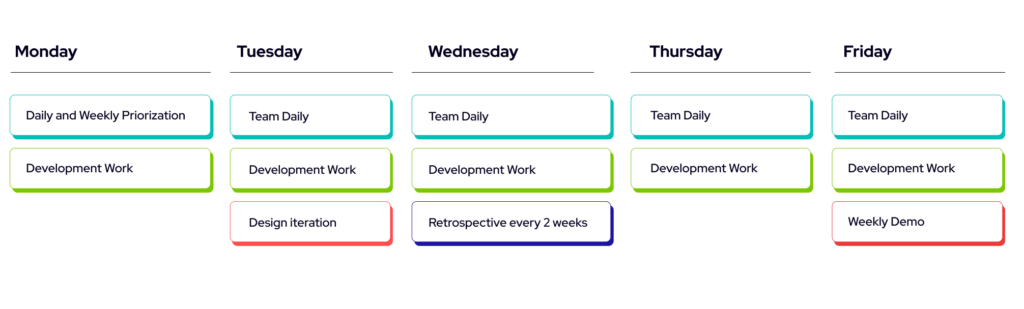
When the development has begun, we aim to have a clear line of discussion with the client throughout the process. The team discusses with the client to set up regular rituals on a weekly or bi-weekly basis to figure out how to prioritize development and receive regular feedback to make sure we’re going in the right direction.

We like to highlight the need of getting something usable to the client as soon as possible. This allows us to get started with user-testing from the early stages of a a project as well. When we have a tangible product for the client and the users to preview, it’s more likely we’re focusing on the right features during this important phase in the product’s infancy.

When we’re building something from the previously described user-focused mindset, having a feedback loop becomes even more crucial. While we work with the regular toolset of Kanban boards and agile frameworks, we rarely build things in the format of sprints to keep things as flexible as possible.

This does not mean we’ll avoid backlogs and estimations all-together, but the fast paced iteration often benefits from a shorter iteration-loop with the client and the users.

Changing course

Sometimes, during the development process, we might find out that some things are not doable within the current scope of the delivery. At these points, it’s important to indicate the issues early so we can make the required changes in a way that keeps the spirit of the product alive and allows the client to still reach our goals. After all, we’re building lovable products here so it usually is more beneficial to postpone a feature that can’t be delivered in a lovable state rather than diluting the overall quality of the product by implementing an immature feature that is not crucial to the use case. Alternatively, a lovable but temporary crutch could be implemented, provided that it can be replaced later on with a technically robust one without changing the things that are going to make the product lovable.

Summary

In this second part we’ve discussed in a bit more detail about our choice of technologies and the concrete development cycle how we make the most of the time spent delivering the product.

We think it all comes down to a few things:

  • Keeping an open channel of communication during the development phase.
  • Selecting the right technologies for the right job.
  • Iterating over something tangible and remaining open for change.
  • Getting the users involved early.

In the third part, we’ll look a bit more at what happens and how things might change once our MLP is out in the real world.


Part 1: Web Applications: How We Build Minimum Lovable Products in 2025 – Gaining a Solid Understanding
Part 2: Web Applications: How We Build Minimum Lovable Products in 2025 – Building a Lovable App
Part 3: Web Applications: How We Build Minimum Lovable Products in 2025 – Launching the Product

How we build minimum lovable products in 2025 – Gaining Understanding

Web Applications: How We Build Minimum Lovable Products in 2025 – Gaining a Solid Understanding

Be warned. This 3-part article will be rather opinionated, and you might disagree with some of our choices and approaches. That’s fine! We’ve found from working with our clients that certain technological and operational selections will make things run smoother. Feel free to disagree with them and let us know what your team likes to do differently!

At Identio, we work with a mix of clients in the private and public sectors at different stages of their lifetime. We feel like the approach described here can be relatively easily adapted to different clients but works best for early-stage startups or businesses with a small amount of existing software services that they wish to integrate into a new product. This series explores the concept and the development process of a minimum lovable product (MLP), a concept that aims to deliver not just technically functional software but also the kind that users enjoy using.

We’ve split this article into three parts that will be released a week apart, going from the preliminary information gathering phase to the delivery of the Minimum Lovable Product to the next steps taken once the first version of the product is in the hands of your users.

The Minimum Lovable Product

To give a brief introduction to the uninitiated, an MLP is a product that has been developed and designed to the point where users will eagerly adopt its use. The easiest way to explain the difference in our definition is to provide some comparison between a Minimum Lovable Product and the more familiar Minimum Viable Product.

Minimum Viable Product

  • Rudimentary proof of concept-level skeleton.
  • Simple feature set to appease requirements.
  • Allows users to test an idea but usually lacks traction.

Minimum Lovable Product

  • All of the above.
  • Fleshed out User Experience in terms of primary workflows.
  • Evokes positive emotions in the user.

By definition, MVP gets the job done, but often software products fail to get users, or the users are begrudgingly using the tools in lieu of alternatives. When the user experience affects the users greatly or the aim is to reach a wide user base, it is worth putting in the extra effort to transform viability to lovability.

Before we begin

There’s usually a few weeks’ period at the beginning of product development where we spend time researching and discussing details like contracts. We start the learning process as part of the sales process, but we really get to know the client at the beginning of the delivery in kick-offs or design sprints.

Understanding the Client

We like to know our clients and their business well. Knowing the team or teams you’re working with, what domains they are working in, and what their day-to-day business is like. For early-stage startups, this usually boils down to meeting the team and learning about who they are and what their expertise is.

Building the first version of a product is often at its core communicating clearly and understanding the what and why of the problem we’re looking to solve. We think it’s important to include the client in the development process early on. A transparent exchange of information makes things easier down the line.

Understanding the Product Vision

Once we’ve got a clearer understanding of the client, it’s time to dig deeper into the problem. Our teams are at their best when they work at the crossroads of business problems and technical solution development.

After meeting the client’s people, we dig deeper into the actual problem we’re trying to solve, usually based on the client’s description. We do our best to make sense of the following things:

  • Why is the client interested in building this product to solve a problem?
  • Why is the client specifically interested in solving the problem?
  • Why are they looking to solve the problem right now?

Getting the answers to these questions allows us to narrow down the scope of the first iteration of the product. We usually want the first version to provide a subset of the final product’s functionality, so we can deliver something usable, testable, and lovable for the users.

Understanding the Users

Only on the rare occasion is the client the direct user of the product, and understanding just the client might be enough. Although we might even get a very clear understanding of the users from the client, it still usually pays to spend some time understanding the different groups of users we will be working with. This might mean creating example user personas, their needs, and use cases. Getting real potential users involved with the initial use case definition is greatly beneficial. Having a user-centered approach requires an ongoing dialogue with the intended users to focus on the problem that requires solving and avoiding designing a solution that doesn’t address the root issue at hand.

Boiling down to the most fundamental issue at hand might also reveal different needs and use cases for different user segments. Understanding them will also help to decide whether to focus on one segment or if the different use cases can be catered to without compromising the user experience and, by extension, the lovability of the product.

Focusing efforts on the Right Things

Now that we have a better understanding of the problems we’re looking to solve, we can focus our efforts on the right things:

  • Which features are a priority to the user
  • Which things need to be tested out first

With user-focused priorities, you can focus on how to bring these features to life: What is required for the use case or user flow to be fluid and intuitive? What has to work for the user flow to function as intended? What requires UI elements and interaction, and what can happen under the hood? Answering these questions usually leads to mapping out more complex technical issues that might need solving and gives you the framework from which to build upon in possible future development.

Summary

The initial phase of delivering an MLP contains a lot of work that gives us a better understanding of what our client wants to build and why. This process continues throughout the development work, and we often work in iterations based on our best understanding that grows over time.

Here’s a short list of things we look into at the beginning of a product delivery:

  • Understanding the client: understanding the client’s background, their previous efforts, and why they’re focused on tackling a problem with a software product.
  • Understanding the problem: who it concerns, why it needs fixing, and what previous work exists to tackle this issue.
  • Understanding the users: why the users are concerned with this problem, what kind of user groups are involved, and how the product fits into their existing workflows.
  • Understanding the priorities: making sense of what features in the product are crucial to tackle the problem, understanding which solutions are most important for the users, and finding the difficult challenges we should be concerned with from the beginning.

Next: Work in Progress

In the next part, we’ll go a bit deeper into the Work in Progress phase, where we start building the solution for the problem: The Product. We’ll provide some insights as to which technologies we think work well for these kinds of product deliveries, and we’ll provide an outline for how the development process looks like.


Part 2: Web Applications: How We Build Minimum Lovable Products in 2025 – Building a Lovable App
Part 3: Web Applications: How We Build Minimum Lovable Products in 2025 – Launching the Product

UI and UX – what is the difference between them?

You often see the abbreviations UI and UX used interchangeably or side by side. The abbreviation UI stands for “user interface,” which refers to the interface through which the user interacts with a service or product. UX, on the other hand, stands for “user experience,” which refers to the overall experience a user has when interacting with a service or product. The user interface forms a part of the overall experience that the user gets from using the service or product.

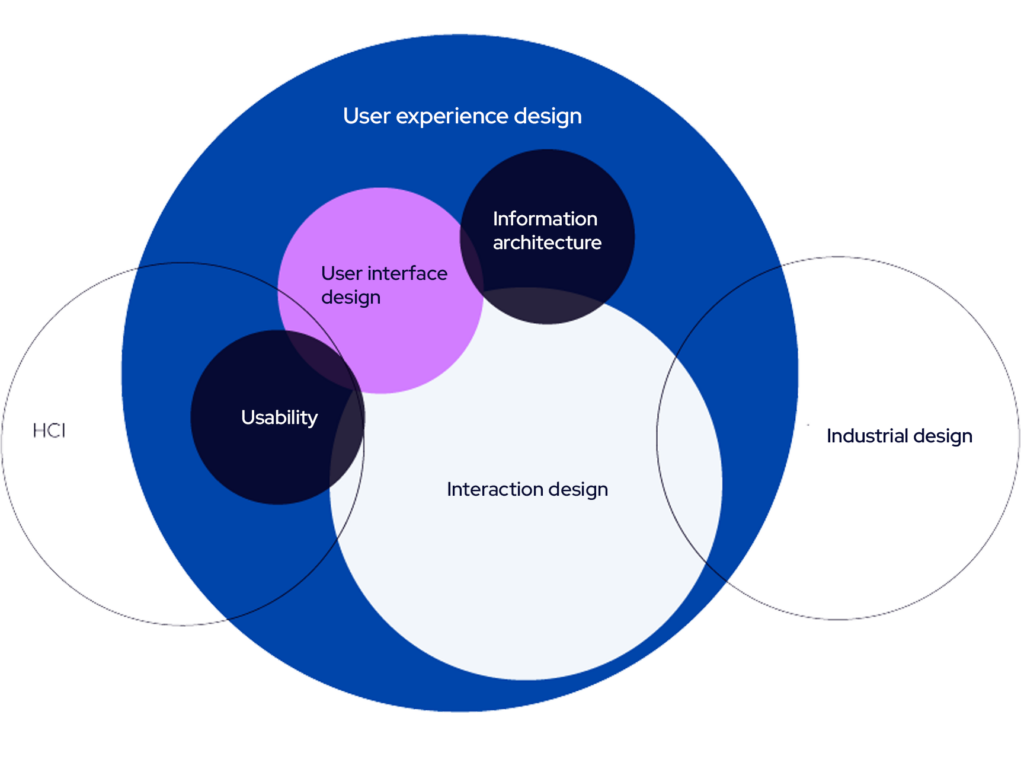
The user interface is, for example, the visible part of a website or application for the end user. Dan Saffer aptly describes the user interface in his book Designing for Interaction as the tip of the iceberg. What is visible on the surface is only a small part of a carefully designed whole.

Areas of user experience design, according to Saffer.

The user interface of a website or application is built from elements such as functionality, the layout of selected components in relation to one another and the screen size, colors, typography, and illustrations. The user experience, on the other hand, is shaped not only by the user interface but also by factors such as the accessibility, usefulness of the service/product, and how and from where the user arrives at the product/service.

User interface design is an important part of user experience design, as it is often the most visible aspect of the entire process. Visual design can, for example, support the detection of important elements in the correct order and help the user interpret the interface as intended. Perhaps due to the significance of interface design, it is sometimes confused with user experience design. However, it is essential to remember that the user interface is not the only part of the user experience. A good interface cannot save a poorly designed experience, but a bad interface can easily ruin an otherwise well-designed experience. The interface can be made visually impressive and distinctive, but usability, accessibility, discoverability, and other factors that impact the overall experience must not be overshadowed.

So, when considering purchasing UX design services, remember that the price tag should include more than just a visual update to the user interface. On the other hand, when purchasing UI design, you cannot expect to solve issues that require a deeper understanding of how the overall experience is shaped. A designer’s job is to question the needs presented by the client. An experienced designer, after familiarizing themselves with the case, will be able to advise on what would be the most beneficial course of action for that specific situation.

Sources:

Saffer, D. 2005. Designing for interaction: creating smart applications and clever devices. Berkeley, CA: New Riders

Sinkkonen, I.; Nuutila, E. & Törmä, S. 2009. Helppokäyttöisen verkkopalvelun suunnittelu. Helsinki: Tietosanoma


What does software development cost?

One of the most central and therefore also one of the most common questions related to software development in terms of investments is: “What does software development cost?” Naturally, this is one of the most critical factors when business decision-makers evaluate the current state and future needs of their digital systems.

Some of the most common challenges related to systems include the following situations:

  1. digital services used by the company are entirely or partially outdated,
  2. systems only partially meet the company’s business needs, or
  3. existing digital systems do not support business scalability.

Digital services, such as web applications or mobile applications, are at their best key enablers for scaling a business and achieving related goals. When it comes to software development, delivering business value is always our top priority. We take it seriously that our clients receive genuine value from the systems we develop.

For us, business value means gaining a comprehensive understanding of the client, their needs, and the system to be developed even before starting the collaboration. Understanding the client, the problem to be solved, and the users of the product or service is therefore a crucial starting point for the partnership. This ensures that the product or service addresses a genuine need, which, in turn, is an essential foundation for making the investment.

In this article, we delve into the question of what software development costs. Since every company’s needs are unique and development is carried out through a wide variety of collaboration models, we cannot provide a very precise estimate of software development costs in this text. However, we aim to address this question at a high level and hope to have the opportunity to discuss your needs in more detail to provide a more accurate estimate of the project’s cost.

What factors influence the cost of software development?

The cost of software development is influenced by numerous factors. The most significant ones are the complexity of the work and the scope of the project, meaning how complex the system being developed is. This includes factors such as the number of features to be developed, the number of third-party backend systems involved, and various technological solutions. Other factors that affect the cost include the size of the team, the experience level of the developers, and the project timeline.

The size of the development team and the collaboration model

The size of the team, including software developers and UX designers, is naturally one of the key factors in pricing. The hourly rate for software development can range between 70 € and 150 €, depending on the consultant’s expertise. UX design typically has an hourly rate in the range of 80–100 €.

Another key factor influencing the cost is the collaboration model we choose as the foundation for our partnership.

If our client company has its own development team and needs extra hands or specific expertise, Identio’s software developer works as part of that team. This type of “additional resource” is an easy alternative to hiring a dedicated software developer. Additional resources are often needed when the in-house team lacks the technological expertise required for the project or when the project aims to prototype the suitability of new technologies for the client’s use. Other situations where consultants can be utilized include boosting efficiency as deadlines approach or ensuring continuity of development work during holiday periods. This is our most common collaboration model, and in such cases, hourly-based pricing often applies.

Additionally, we offer two different approaches where Identio’s own development team creates an entirely new system tailored to the client’s needs. The first approach involves close collaboration with the client, while the second is more of a turnkey solution. In the close collaboration model, we focus on transferring knowledge and skills to the client organization through coaching-oriented software development. In the turnkey solution, on the other hand, we develop a predefined product or service with a more independent approach, keeping the client’s role lighter. This model is well-suited for situations where the goals are clear, and the development team and client are aligned on the system to be developed.

Pricing for both of these models can be either hourly-based or fixed. In the case of fixed pricing, we agree with the client on a price range within which we commit to staying.

Other factors affecting the cost of software development

Several other factors also influence the costs of software development, and these should be considered when planning the project budget. The first key aspect to evaluate is the scope of the project. Are we building a lightweight MVP (Minimum Viable Product), an MLP (Minimum Lovable Product), or a more comprehensive software solution? Smaller projects are naturally more affordable, but the planning, implementation, and testing of larger systems require more resources.

The technologies and platforms used also affect costs: some technologies require specialized expertise, which can increase the project’s price tag. The team composition, tight deadlines, and post-launch maintenance and further development costs are other key variables that should not be overlooked when planning the budget. These factors together determine the appropriate budget to allocate for software development.

How to make software development cost-effective?

Cost-effectiveness in software development begins with a thorough definition phase. When a development project is carefully planned in advance, expensive changes in later stages can be avoided. A comprehensive requirements definition saves both time and money and helps the team focus on what is essential. Additionally, prioritizing the most important features is key, for example, through MVP (Minimum Viable Product) or MLP (Minimum Lovable Product) thinking. This means focusing in the early stages of the project on delivering a minimal yet lovable solution that addresses clearly defined needs.

Through agile development and iterative thinking, the development process can adapt quickly to changing needs and feedback from users. This approach helps allocate the budget to features and elements that are genuinely important from the users’ perspective.

Choosing the right team is also a critical factor in ensuring cost-effectiveness. A team with experience in similar projects can typically deliver high-quality results while managing the project efficiently and smoothly. Cost-effectiveness doesn’t always come from selecting the cheapest provider or partner but from professional work where things are done right from the start.

Well-executed software development delivers long-term value and, most importantly, supports the growth of your business. In contrast, cheap development done with insufficient expertise can ultimately result in costly repairs and rework.

Concrete pricing examples

It is challenging to discuss software development costs with absolute precision, but I hope these examples provide you with a general idea of the expenses involved in software development.

These examples are based on Identio’s pricing and apply to digital products and services tailored and developed to meet your needs, as well as the hourly billing rates of our consultants.

Tailored digital products and services, and consultants’ hourly rates
Medium-sized software: ~30 000–100 000 €
Comprehensive custom software: ~100 000 € +
Software development / IT consultant hourly rate: 80–120 €
UX designer’s hourly rate: starting from 85 €

Software development cost estimate

The cost of software development is highly case-specific, and we hope this article has provided you with indicative information about the scale of the investment. We look forward to discussing your specific needs and exploring what software development might cost in your unique situation.

Contact our sales team, and we’ll help you identify your company’s specific software development needs. Through discussion, we can jointly assess the scope of technical implementations and provide a rough estimate of development costs.


Identio as a technology company

Identio’s software developers specialize in consulting, which means we work closely with our clients throughout the entire process—from designing a digital product or service to its development and maintenance.

We design sustainable software architecture solutions and develop digital products and services with a focus on user-friendliness, scalability, and cost-efficiency. We are also here to assist you with updating and modernizing your existing systems.

Design sprint is an important part of UX design – 5 phases

What is design sprint?

Former Google Ventures design partner Jake Knapp developed the design sprint process for Google in 2010, drawing inspiration from Google’s own product development culture and IDEO’s design thinking workshops. In design sprints, teams work on problems and set goals, progressing from mapping out a product or service to testing a potential solution—typically within a five-day cycle.

Sprints are also a key part of agile development. The biggest benefit of a design sprint is the time it saves, as well as the insights gained during the process regarding the future product or service, its opportunities, and challenges. A design sprint provides a clear picture of the next steps in development and ensures that the team is aligned on the desired outcome.

The five phases of design sprint

A design sprint is divided into five phases, which are typically scheduled over one week, with each phase taking place on a different day. However, in some cases, the sprint can be adapted to a more flexible timeline, such as a two- or three-week development cycle.

The core idea of a design sprint is to quickly and efficiently gain a clear understanding of the product or service being developed. For this reason, it is generally not advisable to extend the sprint for too long. However, in some situations, deviating from the traditional one-week model may be justified.

1

Exploration

During the exploration phase, all essential information is shared within the team to ensure that all parties have a unified understanding of the project’s background and current state. This phase aims to identify and analyze pain points that hinder or slow down the achievement of goals. A thorough understanding of these pain points is crucial, as they guide future design and development decisions.

Additionally, in the exploration phase, the scope of the project is outlined to keep the work realistic within the given schedule and resource constraints.

Identio’s approach

Workshop #1 – In the first workshop, we go through the key aspects of the project together with the client. The discussion focuses particularly on the project’s objectives and technical foundations, ensuring that all stakeholders have a shared understanding of the goals and requirements.

2

Ideation

The second phase of the design sprint, ideation, is a creative stage where the team develops potential solutions to improve the product or service. The goal is to address the key questions and challenges identified during the exploration phase.

In the ideation phase, the focus is particularly on solving the identified pain points with new perspectives and approaches. The team considers how these pain points can be resolved while taking into account technical feasibility and user experience.

By the end of the ideation phase, the team has multiple options that will be evaluated in the next stage.

Identio’s approach

Workshop #2 – In the second workshop, we brainstorm alternatives together with the client for the questions that emerged during the exploration phase. We also present our technology proposal for implementing the product or service.

3

Decision-making

In the decision-making phase, the team focuses on selecting the best ideas to move forward to the prototyping stage. Various tools, such as the Sticky Decision method, are often used to facilitate the decision-making process.

After the decision-making process, a storyboard is created to visualize the flow of the selected ideas. The storyboard helps assess whether all chosen ideas fit into a single prototype. By using the storyboard, the team can outline the user experience of the product or service and ensure that the selected ideas form a cohesive and functional whole.

Identio’s approach

Workshop #3 –In the third workshop, we prioritize and define the scope of the interactive demos to be implemented in the Prototyping phase. Methods such as Planning poker can be used to support the process.

4

Prototypes

The fourth phase of the design sprint, prototypes, focuses on creating concrete models based on the ideas selected during the decision-making phase. The team can create one or multiple prototypes representing different solutions and approaches.

During the prototyping phase, an interactive demo is developed to allow users to experience the product or service. This demo serves as a crucial tool in the next phase, where it will be tested. The prototype should be realistic enough to provide an authentic experience, but it does not need to be perfect or include all final features. The most important aspect is that the prototype illustrates the key ideas and enables practical testing.

Identio’s approach

We build an interactive demo using the Figma tool. With the prototype, we discuss potential gaps and areas for improvement with the client before testing.

5

Testing

The purpose of testing is to gather valuable feedback on how well the prototype meets user needs and expectations. This phase also helps identify potential problem areas and gaps in the user experience before the actual product development.

The feedback collected during testing is reviewed, and necessary adjustments are made to avoid unnecessary work in the final product development.

Identio’s approach

We test the prototype together with the client. We document the observations from the testing and discuss the next steps before starting the development of the product or service.

Supporting development with a design sprint 

A design sprint helps quickly gain an overall understanding of the state of the product or service before starting actual development.

Potential benefits of a design sprint include:

  • The goals and pain points of the product or service have been mapped out, and the development team is aligned on the product or service being developed.
  • The ideas from the ideation workshop have been documented, reviewed, and prioritized.
  • A preliminary assessment and proposal for technology choices have been made.
  • An interactive demo of the product or service has been built, helping to visualize the desired outcome.
  • Through testing, areas for improvement have been documented.
  • The actual development of the product or service can begin.

During a design sprint, the team maps out goals and challenges, generates solution ideas, selects the best ones, builds a prototype, and tests it in practice. This process helps avoid potential pitfalls before starting actual development and ensures that the team is working toward a shared goal.

If a Design sprint sounds like the right approach for you, feel free to contact us!